
User lifecycle
Create and update customer users, reset passwords, revoke sessions, maintain groups, and apply Microsoft 365 license changes.
Microsoft cloud operations
Manage users, licenses, service health, security settings, guest access, Azure subscriptions, and cloud spending across customer tenants from one self-hosted platform.
Self-hosted deployment. Free License available. Customer context stays visible while technicians work.
The operating problem
Every customer adds another set of users, licenses, groups, subscriptions, security settings, alerts, and reports. Repeating the same work across separate portals increases technician effort and makes exceptions harder to see. MSPControl brings those operations into a customer-aware workflow without hiding which tenant is being changed.
One operational view
Start from the customer organization, perform the supported task, and keep the surrounding service context available to the technician.
Create and update customer users, reset passwords, revoke sessions, maintain groups, and apply Microsoft 365 license changes.
Review subscription capacity, assignment and validity, then make intentional license changes with the customer scope visible.
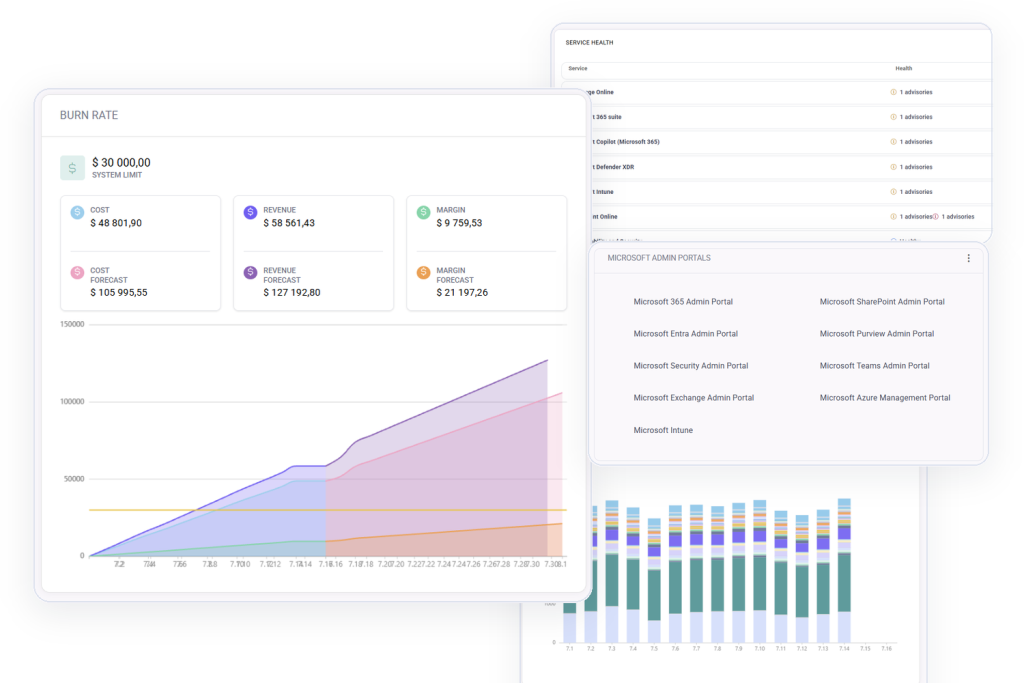
Check Microsoft 365 service health, OneDrive usage, subscription status, and customer organization settings.
Review Safe Links, anti-phishing, anti-spam, Standard Protection, security defaults, MFA, and sensitivity-label settings supported by the platform.
Review Microsoft 365 security baseline managementReview Microsoft 365 license optimizationCompare Microsoft 365 management toolsCompare MSPControl and CIPPReview Copilot readiness and AI accessReview Microsoft 365 configuration driftInvestigate Microsoft Entra risky usersReview Microsoft 365 email security
Plan Conditional Access across customer tenants
Review, enable, disable, and remove guest users while keeping identity and organization context together.
Review cost by resource, current spend, budget, forecast burn rate, daily consumption, and downloadable reports.
Endpoint operations
Review synchronized device inventory, reuse configuration and compliance templates, manage eligible Windows app records, and work with Windows Autopilot and Enrollment Status Page profiles without hiding which customer tenant is changing.
Identity lifecycle
Use the practical checklist to contain access, preserve business data, separate mailbox and OneDrive handoff from the Disable User action, remove licenses at the right time, and verify each result.
From signal to documented action
VirtuBot supports AI-assisted evidence collection and automated containment within the configured response workflow. Security tickets, identity state, mailbox-rule review, and audit context help technicians continue the investigation and document the result.
Open the compromised account response guideReview Azure cost, burn rate and backup monitoringReview Microsoft 365 backup monitoring
Connected operations
Microsoft 365 administration becomes more useful when the technician can move into security, devices, documentation, backup oversight, and tickets without rebuilding the customer story.
Deployment and control
MSPControl is self-hosted. Connect supported Microsoft services deliberately, use delegated relationships where required, and keep the platform under your operational control.
Common questions
It is the operational process of managing users, licenses, services, security settings, subscriptions, and related work across more than one customer Microsoft 365 tenant.
No. MSPControl centralizes the supported daily operations and provides links into Microsoft administration portals when a task requires the native experience.
Yes. MSPControl is deployed in an environment controlled by the service provider. Review the prerequisites and deployment documentation before connecting production services.
Yes. The MSPControl Free License is available from the Downloads Center. Paid plans add capacity and support options described on the Pricing page.

Self-hosted. Free license available. No credit card required.