Copilot readiness and Shadow AI

Prepare for Copilot with a Clear View of AI Access

Before expanding Copilot, establish who needs access, what your reports can show, and which applications already have permission to customer data. Bring available evidence into the review, resolve the gaps, and approve a measured rollout.

For administrators and MSP technicians. Available reads depend on the installed MSPControl version, connected tenant, Microsoft permissions, services and licensing.

LicenseConfirm eligibility, assignment and the pilot group.

AccessReview sharing and consent with the responsible owner.

EvidenceSeparate usage, audit records and missing data.

DecisionApprove the pilot and record what still needs review.

What Is a Microsoft 365 Copilot Readiness Assessment?

A Microsoft 365 Copilot readiness assessment checks technical eligibility, business use cases, data access and the controls needed for a rollout. MSPControl contributes license visibility and supported API/AI reads for Copilot usage, interaction audit queries, delegated OAuth consent, SharePoint tenant settings and selected Azure AI resources. Combine those inputs with Microsoft’s readiness and data-governance tools; no single report establishes that a tenant is ready.

Start with the Licenses the Customer Actually Holds

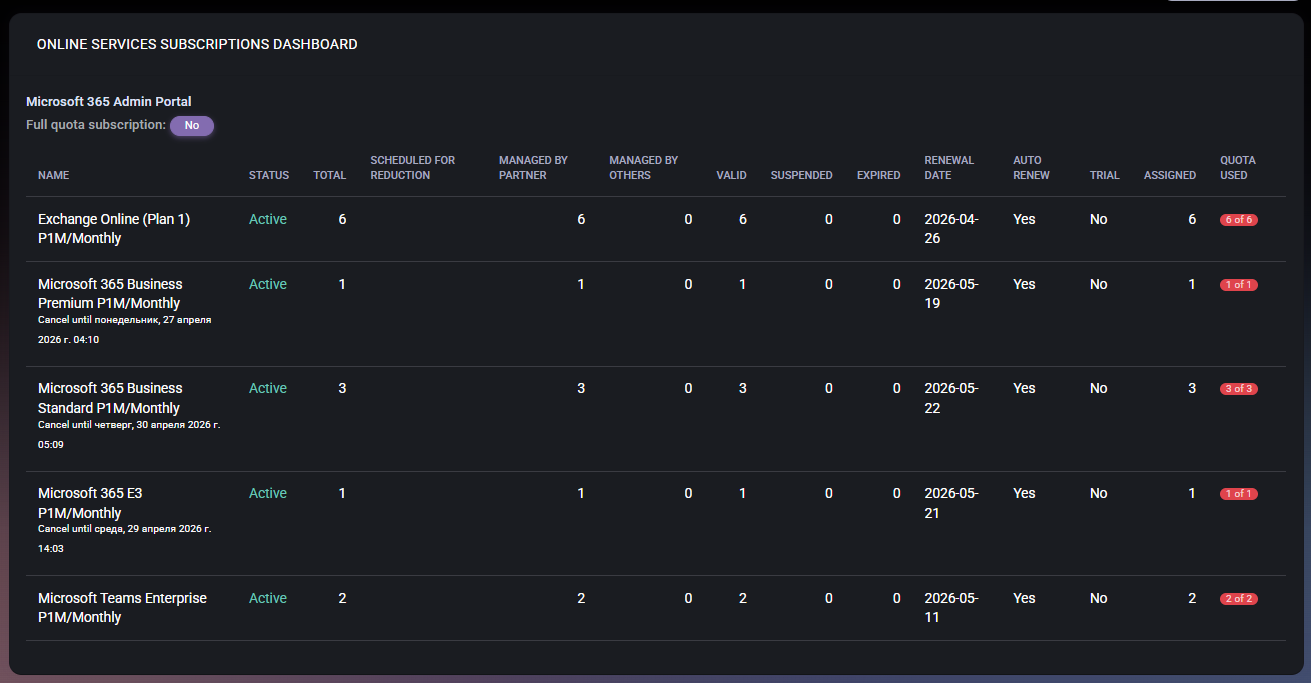
Review subscription status, assignment and renewal context before changing the pilot’s license allocation. This dashboard shows subscription capacity; use the separate Copilot usage reads and Microsoft readiness report for their respective evidence.

MSPControl Online Services Subscriptions Dashboard with populated license quantities, status and renewal dates. Genuine documentation screenshot from April 2026; values illustrate the subscription interface, not Copilot usage or a readiness score.

The operating workflow

Build the Evidence Before Expanding Access

Define the pilot and its purpose

Identify the customer tenant, pilot users, intended use cases and decision owner. Check current Microsoft eligibility and licensing requirements. Record what a useful outcome would look like before buying or assigning more capacity.

Check licenses and usable activity data

Review subscriptions and user assignments in MSPControl, then use the available Copilot reports through the API/AI connector. Confirm the reporting period, refresh date and whether identities are concealed. Low activity starts a conversation; it does not prove a license is unnecessary.

Review access to the content users will reach

Use the supported SharePoint settings and site-usage reads as starting context. Have site and data owners review actual access, broad sharing and sensitive content with the appropriate Microsoft tools. Tenant defaults and storage activity are not a file-permissions assessment.

Review delegated application consent

Inspect application identity, publisher, consent type, principal and granted scopes in the OAuth consent report. Identify the business owner and intended purpose of unfamiliar AI-related integrations. Review application permissions separately in Entra; this report covers delegated grants.

Check activity and inventory gaps

For available Copilot interaction evidence, start a query, check its status and retrieve its records. Review supported Azure AI resources in the configured subscription where relevant. Use configured Microsoft discovery telemetry for other AI services; browser or personal-account use can be outside tenant consent records.

Approve, verify and revisit

Record findings, owners, unresolved gaps and the approved pilot scope. Make any access or policy changes through the responsible administration surface and verify the result. Revisit usage and data access after the pilot; an AI summary is supporting analysis, not approval.

What MSPControl supports

Use the Evidence That MSPControl Actually Exposes

The subscription and user-license screens are documented interfaces. The AI-governance data below is exposed through supported API/AI actions; it is not presented here as a dedicated graphical Copilot-readiness dashboard.

Copilot usage reports

Read supported per-user activity, user-count summaries and trends for a selected period. Check the returned refresh date and identity visibility before joining usage with assignments or drawing adoption conclusions.

Copilot interaction audit

Start a scoped audit query, check its progress and retrieve the available records. Query acceptance is not query completion. Returned events do not guarantee complete prompt content, unlimited history or coverage of every AI service.

Delegated OAuth consent

Review delegated permission grants enriched with application and resource details. Use the report to investigate unfamiliar integrations; it does not automatically classify every AI vendor or establish what data an application actually accessed.

SharePoint and Azure context

Read supported SharePoint tenant settings and site usage, plus Cognitive Services accounts, their deployments and machine-learning workspaces in the configured Azure subscription. These are bounded inputs, not an exhaustive inventory or automatic remediation system.

Current boundary: No automatic readiness score, full Shadow AI discovery, complete site/file-permission audit, universal Copilot Studio agent inventory, DLP enforcement or guaranteed prevention of data exposure is claimed. Confirm availability in the installed version and use Microsoft’s dedicated controls for the additional scope.

Interpretation and coverage

Know What Each Signal Can and Cannot Establish

Evidence Useful for Follow-up still needed
License assignment and subscription quantities Understanding available capacity and the selected user’s assignment. Microsoft eligibility, business need and a deliberate rollout decision.
Copilot usage reports Reviewing available adoption and last-activity evidence. Freshness, concealed identities and business context; no automatic savings calculation.
Copilot audit-query records Investigating returned interaction events for the requested scope. Query completion, retention, collection errors and the record content actually available.
Delegated OAuth grants Identifying consented scopes, applications and principals. Application permissions, actual use, personal accounts and browser-based AI outside these grants.
SharePoint tenant settings and site usage Starting a sharing and content-ownership review. Effective site/file access, sensitivity and oversharing assessment in the owning Microsoft service.
Selected Azure AI resource reads Reviewing supported resource types in a configured subscription. All relevant subscriptions, complete paging/coverage, other resource types and any non-Azure AI use.

Configuration and next actions

Open the Guide That Owns the Next Step

Common questions

Copilot readiness and Shadow AI FAQ

Can MSPControl assess Microsoft 365 Copilot readiness?

MSPControl supplies relevant license information and supported API/AI reads for usage, interaction audit, delegated consent, SharePoint settings and selected Azure AI resources. An administrator combines these inputs with Microsoft eligibility, data-access and governance checks. This page does not claim an automated readiness score or certification.

What is Shadow AI?

Shadow AI is AI use outside an organization’s approved inventory or governance process. It can include unapproved applications, browser services, personal accounts or integrations. A tenant’s OAuth grants reveal one access path; they cannot establish every way people use AI.

Does MSPControl discover every AI application employees use?

No. The delegated OAuth consent read shows applications with supported grants in the selected tenant. It does not automatically classify all AI applications, cover every permission type or observe all browser and personal-account activity. Broader discovery needs appropriate telemetry and separate controls.

Does Copilot usage prove that a user needs or does not need a license?

No. Usage is one input. Verify the reporting window, refresh date, identity visibility and the user’s role. A pilot user may need training; missing or concealed data must not be treated as inactivity. License changes require a separate approved decision.

Are SharePoint tenant settings enough to rule out oversharing?

No. Tenant-level sharing settings and site-usage reports do not show every effective permission. Review sites, files, broad access and sensitive content with owners and the appropriate Microsoft tools before relying on the result.

Where are the Copilot and consent reports available?

The reviewed implementation exposes these data reads through API/AI actions, scoped to a customer organization and gated by permissions. The documented subscription and user-license screens remain separate. Verify the installed version and available actions rather than expecting a dedicated Copilot dashboard.

Will this workflow automatically block unsafe AI use?

No. This page describes evidence collection and an administrator-led review. Changes to consent, sharing, discovery, DLP or other controls belong to their supported administration workflows, require authorization and must be verified after the change.