
Identify and classify
Use an asset identifier, a clear name and the relevant section, category and type.
IT documentation and assets
Bring asset records, operational notes, documents and credential context into the customer workflow. Give the next technician a clear place to start and a record to maintain.
For IT teams and service providers. Self-hosted MSPControl with configured Microsoft storage services for supported documentation features.
IT documentation software organizes the records technicians need to understand and support an environment: assets, configuration notes, procedures, files and access information. MSPControl connects these records through customer context and tags. Asset documentation describes what a resource is and how it is managed; device inventory reports what a supported collection source has observed. Use both without treating them as interchangeable.
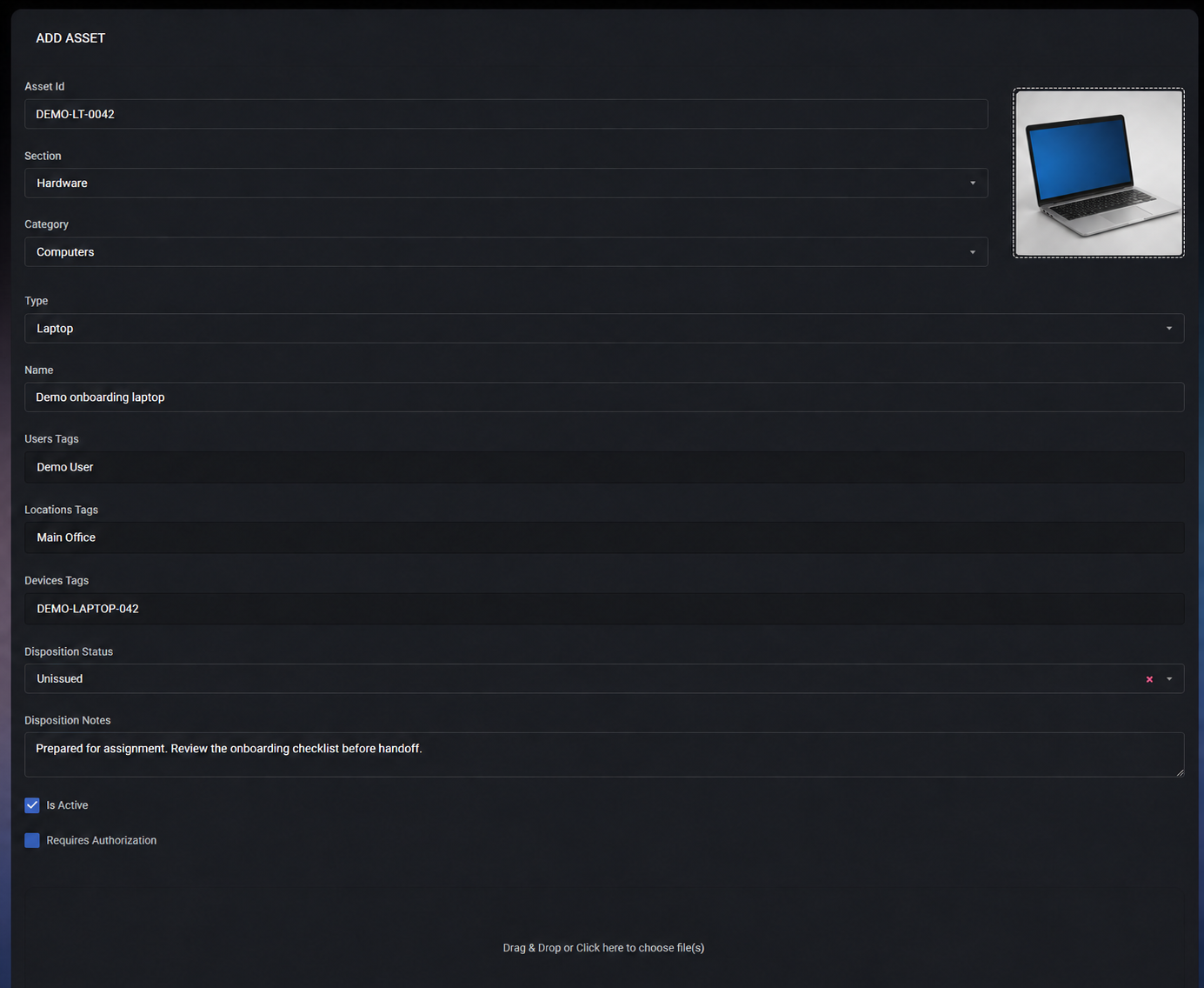
Use an asset identifier, a clear name and the relevant section, category and type.
Associate the asset with users, locations and devices so the next technician can find the related record.
Review disposition, notes and authorization when responsibility changes. This form shows the earlier Docs layout; presentation varies by version.
The operating workflow
Confirm the selected customer and the affected user, location or device before opening or changing a record.
Search or filter maintained assets by classification and tags. Check its name, identifier, disposition and any linked device.
Open associated notes and documents for the procedure, known exception or previous decision. Confirm that the information still matches the environment.
Keep credentials in Passwords rather than ordinary notes. Where authorization is required, follow the configured request or peer-access workflow.
Use the owning device, identity, application or service workflow. Documentation provides context; verify the actual result in the system you changed.
Record the change, relevant date, remaining issue and next action. Update asset disposition or tags when ownership or location changes, and keep the service ticket current separately.
What MSPControl supports
Use the available documentation modules in the selected customer context. Enable the relevant policies and configure their storage and access prerequisites first.
Maintain asset names, identifiers, sections, categories, types, disposition and user, location or device tags. Review related records and recorded asset events.
Create rich-text operational notes with contextual tags. Organize supported document files in the configured customer Teams/SharePoint location; associate them with relevant records.
Use the configured Azure Key Vault-backed password and certificate managers. Review their metadata and available history without treating an ordinary note as a credential vault.
Use Requires Authorization, configured authorizers and peer access where supported. Inspect available logs and access history when reviewing sensitive record use.
Interpretation and coverage
| Record | Use it for | Prerequisite or boundary |
|---|---|---|
| Asset | Identity, classification, disposition and relationships. | A maintained record, not proof of complete discovery or current device health. |
| Note | Handover details, configuration context and procedures. | Enable Notes and use relevant tags and authorization. Review freshness; notes are not automatically validated runbooks. |
| Document | Manuals, operational files and customer documentation. | Configure the supported Teams/SharePoint document connection and permissions. File storage is not an independent backup. |
| Password or certificate | Controlled access to credentials or certificate material and related history. | Enable the managers and configure Azure Key Vault. Stored certificate data does not prove deployment or renewal. |
| Photo | Equipment labels, installation context and physical references. | Enable Photos and configure Azure Blob storage. Inspect images before sharing customer information. |
| Log or access history | Review recorded events and supported access activity. | Coverage belongs to the specific workflow. Do not interpret it as a complete, immutable audit of every system. |
Configuration and next actions
Common questions
You can maintain customer asset records, operational notes, supported document files, photos, passwords and certificates. Tags connect records to assets, users, locations and devices. Availability depends on the relevant policies, permissions and configured storage services.
An asset record contains maintained identity, classification, disposition and business context. Device inventory contains data reported by a supported source. A device can be linked to an asset, but the records remain separate and require different freshness checks.
No. MSPControl itself is self-hosted, while the configured documentation features use different stores. Password and certificate material uses Azure Key Vault, supported document files use Teams/SharePoint, and Photos requires Azure Blob storage. Review these dependencies before deployment.
Notes support asset, user, location and device tags and related filtering. Associate records with the correct context and verify the technician’s access. Tags help organize records; they do not replace authorization settings or automatically validate the content.
Supported documentation records expose authorization and peer-access controls, with configured authorizer workflows where applicable. Review the relevant module, role and policy settings using a permitted test account before relying on a particular access path.
No. This page describes maintained documentation and supported record relationships. Technicians still confirm the information, perform the service task, verify its outcome and update the handoff. No automatic documentation of every system or guaranteed ticket-resolution improvement is implied.
No. Use the available history to review events recorded by the relevant MSPControl workflow. It does not establish complete coverage of external actions, immutable retention or compliance. Retain additional evidence according to your organization’s requirements.

Self-hosted. Free license available. No credit card required.