
Describe the request
Request and Validation provide the context for the rule. Test representative wording, not just the label you expect users to choose.
Ticket routing and automation
Connect supported alerts and requests to your ConnectWise service workflow. Configure board routing, priority and scheduling policies, then verify who owns the next action.
For service desks and IT providers. Requires a configured ConnectWise integration; VirtuBot processing and notifications have their own service and policy prerequisites.
Ticket routing automation applies configured conditions and actions to send service work to an appropriate queue, board or owner. MSPControl provides ConnectWise event-to-ticket mappings, board-selector rules and scheduling-group controls. These are separate parts of the workflow: creating a ticket, moving it to a board and assigning a technician are not the same action. ConnectWise remains the ticket system of record.
Use a specific request, a known source board and a deliberate destination. Company scope keeps the rule tied to the intended customer.
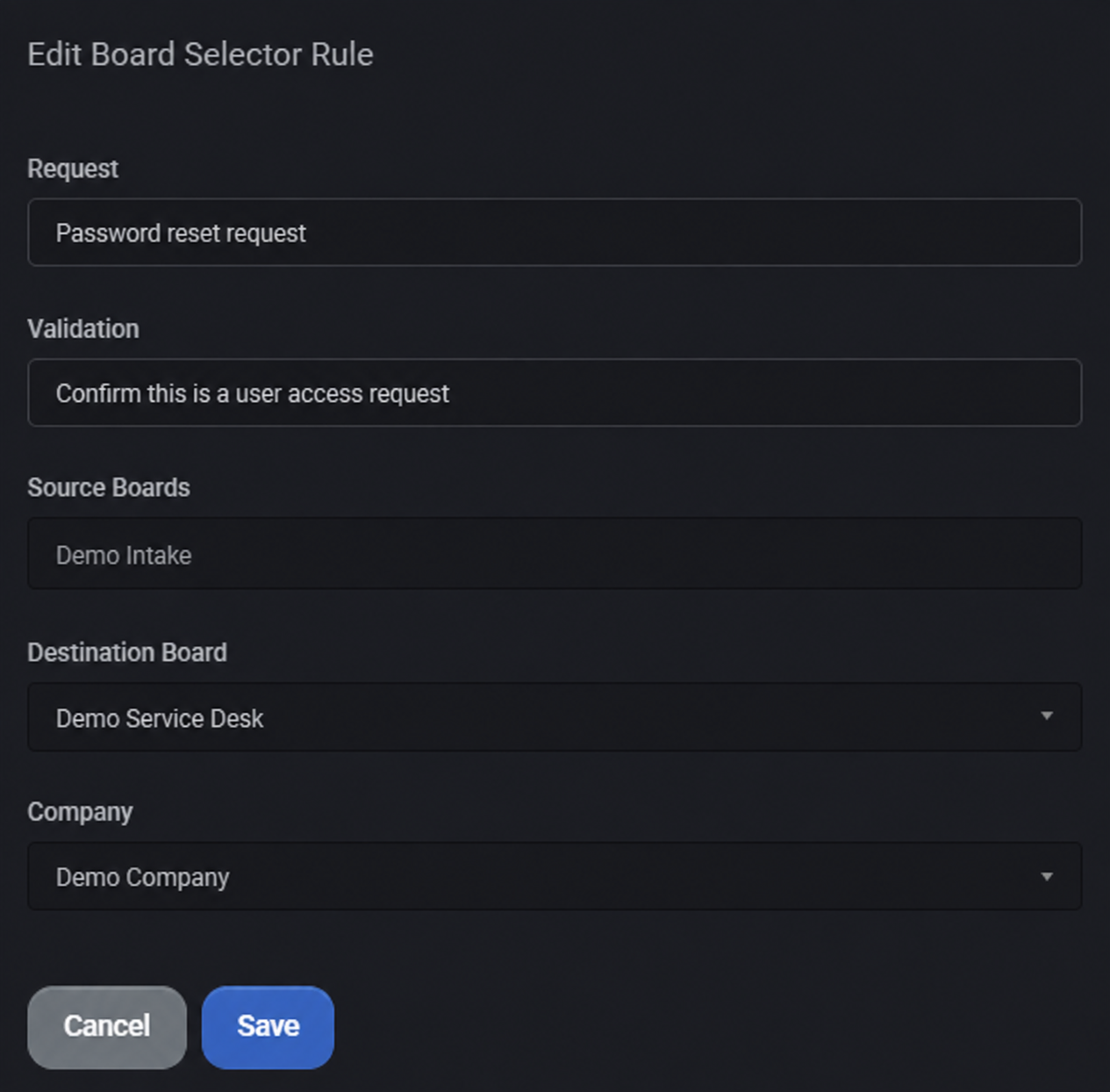
Request and Validation provide the context for the rule. Test representative wording, not just the label you expect users to choose.
Select the source boards and, when needed, company scope. A narrow pilot is easier to review than an unrestricted rule.
Select the intended ConnectWise board. Then check the processor flags and confirm the actual ticket result; saving this form alone does not move tickets.
The operating workflow
Start with a configured product event or an existing ConnectWise request. Confirm the customer mapping and the source data before enabling automatic ticket creation. Receiving an alert is not proof that a ticket was created.
Choose the relevant service board, classification, priority and other fields exposed by that event policy. Configured names must match your ConnectWise setup. A blank optional value can use a ConnectWise default; verify the actual result.
Define the request, validation context, source boards, destination board and optional company scope. Enable the relevant ticket processor and permitted board-update action. A saved rule alone does not execute routing.
Configure scheduling-group members, request handling and processed statuses. Review owner assignment, whether an existing owner may be replaced, check-in requirements and business-hour options.
Configure fallback handling for unmatched tasks where appropriate, and review immediate-work and after-hours settings separately. Keep a staffed manual triage path for ambiguous requests, unavailable members and failed processing.
Pilot with non-sensitive test requests, including a matching case, an out-of-scope case and a no-match case. Inspect the ConnectWise board, classification, owner, status, notes and any task errors. Confirm that a notification reached the intended destination.
What MSPControl supports
Select the supported policies for the work you actually handle. Keep routing, ownership and resolution decisions separate, even when they participate in the same service process.
Configured Microsoft Defender incidents, identity-risk conditions, baseline mismatches and supported backup failures have ConnectWise ticket paths. Scope, synchronization and closure behavior belong to each workflow.
Store request and validation context with source boards, a destination board and optional company scope. The ticket service-board selector has separate processing, update, note and notification controls.
Configure member pools, requests, processed statuses, fallback tasks and owner-assignment options. Review check-in and business-hours requirements before enabling changes to existing ownership.
Use supported internal-note and Teams-notification options alongside the ConnectWise ticket. Inspect task errors and effective ticket state; an audit note is useful context, not a guarantee that every external action succeeded.
Interpretation and coverage
| Decision | Owning control | What to verify |
|---|---|---|
| Create an event ticket | ConnectWise integration settings and the event-specific sync or task. | Customer mapping, enabled source, valid ticket fields and returned ticket ID. |
| Choose another board | Ticket Board Routing Policy plus the configured service-board selector. | Source/company scope, destination, processor enablement and permission to update the board. |
| Classify or prioritize | The applicable Service Tickets policy. | Board/status scope, allowed field changes and the saved ConnectWise values. |
| Assign or schedule work | Scheduling Groups and associated processing. | Eligible members, existing owner behavior, check-in/business-hours options and resulting assignment. |
| Handle an unmatched task | Configured scheduling-group fallback and manual triage. | Where the task went and whether someone is responsible for the next step. |
| Close or deduplicate a ticket | The specific event workflow, not a universal switch. | Its matching key, source state, closure settings and actual ConnectWise result. |
Configuration and next actions
Common questions
No. The ticket workflows described here use ConnectWise service-ticket data and configured integration settings. MSPControl supplies the policy, customer context and supported automation around that system of record.
Yes, supported product workflows include configured ConnectWise ticket paths for events such as Defender incidents, identity-risk conditions, security-baseline mismatches and supported backup failures. Enable and test each path separately; this is not a promise to ingest every alert source.
The rule form exposes Request, Validation, Source Boards, Destination Board and Company. The relevant processor settings determine whether processing and board updates are enabled. Use real ConnectWise board values in production and test how the request is interpreted.
No. A board organizes the work; ownership and scheduling need their own group settings and processing. Verify the assigned owner or resource after routing, especially when an owner already exists or no eligible member is available.
Scheduling groups expose an option to route unmatched tasks to a designated group. Configure and test the fallback for that processing path, and retain a manual triage queue. This is not a universal fallback for every integration or failed API call.
Relevant policies expose business-hour, priority, immediate-work and after-hours controls. Configure the intended member pool and notification destination, then verify the outcome. These settings do not guarantee an on-call response or SLA compliance.
Only where the particular workflow supports and enables that behavior. For example, the supported Azure Backup/Veeam failure-ticket path checks for an existing open ticket by customer and category. Do not assume all sources use that key or that every recovered condition closes its ticket.
Begin with a narrow scope and fictional test requests. Check matches, exclusions, no-match handling, existing ownership and disabled update flags. Confirm saved ticket values and errors before widening scope; keep operational decisions and sensitive customer data out of public examples.

Self-hosted. Free license available. No credit card required.