Manage Microsoft cloud services, Windows devices, security, documentation, backup, and support from one self-hosted platform.
Choose IT Documentation Software Your Technicians Will Use
Choose the system that helps the next technician find the right customer context, get appropriate access and leave the record better than they found it.
For MSPs and IT teams comparing documentation tools. Start with a small pilot, not a full migration.
Start with the work, not the feature count
The best IT documentation software is the one your team can keep accurate and use during a real support task. Evaluate findability, asset relationships, access controls, evidence, freshness, handoffs and an exit route. A polished knowledge base that technicians cannot find or maintain will not solve the problem.
Write down three recurring jobs before booking a demonstration: replacing a laptop, investigating a service account issue, and handing an unresolved ticket to another technician. Ask each vendor to show those jobs using a representative test customer. Use the same people and the same tasks for each candidate.
Seven checks that expose the real fit
Agree your mandatory requirements before scoring. A failed access boundary or missing recovery route should not disappear inside a high average feature score.
IT documentation software evaluation: tasks to run and evidence to retain
Criterion
Pilot task
Evidence to keep
Find the right record
Give a technician a customer name, asset ID or ticket reference, without telling them where the answer is.
They reach the correct record and can distinguish it from similarly named assets.
Keep context together
Follow an asset to its owner, location, procedure and credential reference.
The relationships make the next action clear without copying secrets into notes.
Control access
Repeat the task with an authorized account and a restricted test account.
Allowed work succeeds; protected customer records and secrets remain inaccessible to the restricted account.
Show usable evidence
Change a test record and use a non-production credential. Inspect the relevant logs and history.
The events you require are actually recorded, with actor and time where supported. A history tab alone is not proof.
Keep information current
Ask a second technician to spot a stale procedure and identify who should update it.
Owner, source, last verification and next review are clear. Automated reminders are tested separately if required.
Support a handoff
Transfer an unresolved test issue with a reference to the relevant documentation.
The next technician can continue without the original author. Confirm what your ticket integration does, if any.
Leave and recover
Export a test customer and inspect the supported recovery process before importing production data.
Inventory files, relationships, secrets, permissions and history. Record what is omitted and how recovery works.
Build a shortlist around your operating model
These are starting points for evaluation, not a ranked list or a claim that the products have identical scope. Check the current edition, integrations, deployment options and contract before deciding.
MSPControl
Evaluate MSPControl when you want maintained assets, notes and supported credential and document workflows alongside your customer operations in a self-hosted platform. Include the Microsoft storage prerequisites and platform administration in the pilot.
Consider Hudu when a dedicated documentation workspace is the center of your workflow. Its documentation describes client spaces, asset layouts, related items, passwords and knowledge-base content. Test those relationships with your actual tooling.
Consider IT Glue when you are evaluating a dedicated IT documentation platform and its integration ecosystem. Its feature documentation covers assets, relationship mapping, knowledge base, passwords and APIs. Verify the capabilities included in the plan you are evaluating.
A general wiki can still be a sensible choice if written procedures are the main requirement and you already have asset and credential systems. Test the links and permissions between those systems; a lower license cost may still leave integration and maintenance work with your team.
Test one record from identification to handoff
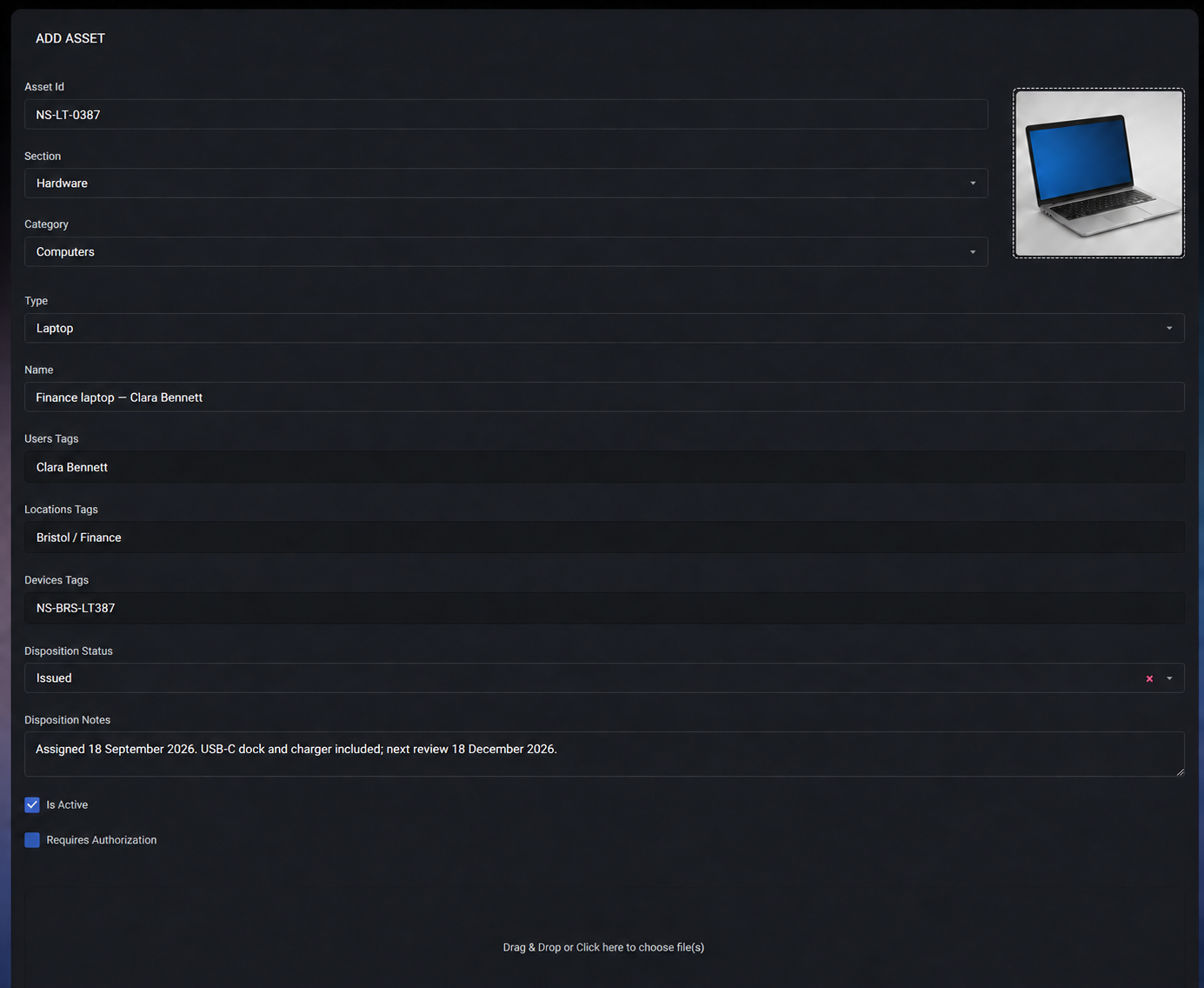
A useful record tells another person what the asset is, where it belongs and what happened last. Use an ordinary workstation or service record to test the workflow, not a perfectly curated sales example.
Identity and context
MSPControl asset records support classification and user, location and device tags. Ask a second technician to find the record from a different starting point.
Current state and next action
Use disposition and notes to explain assignment or handoff. A review date written in a note is a team process; it is not proof of an automatic reminder.
Related records and history
Review the relevant notes, credential references and recorded asset events. Check permissions and freshness before acting.
The documented form illustrates the record structure; presentation and available controls can vary with the installed version.
Where MSPControl fits—and what to verify
MSPControl connects maintained asset records with operational notes and supported password, certificate and file workflows. Its documentation includes authorization and peer-access options, password history and sharing records, and asset logs. These are useful surfaces for a handoff, not a promise that every outside action is captured.
Storage is part of the decision
Password and certificate workflows require configured Azure Key Vault. Supported document workflows depend on Teams/SharePoint configuration, and photos require configured Azure Blob storage. Budget for those dependencies as well as the self-hosted application.
Evidence has a defined scope
Password versions, access logs and share history answer different questions. Inspect the events your organization needs. A read-only log view alone does not establish immutable storage, complete event coverage or a retention guarantee.
Maintenance still needs an owner
Someone must verify procedures, keep tags and relationships useful, and review access. Validate the exact import, export, ticket integration and recovery requirements in your environment; do not assume one button covers every record type.
Choose one representative test customer, several assets, one runbook, an attachment and a non-production credential. Include an awkward case: an old record, a renamed device or a restricted account.
Let another technician work
The author steps back. Record completion, wrong turns, requests for help and corrections. Set your own target time before the pilot; any target is an acceptance criterion, not a vendor performance claim.
Check maintenance and boundaries
Change a record, revoke test access and hand off a task. Inspect the relevant logs. If AI assistance is offered, test its source references and behavior with missing, conflicting and restricted test information.
Test the exit before rollout
Inspect a supported export and recovery route with test data. Record missing relationships or files, who can run the export and where sensitive data goes. Assign an owner to each gap before migrating.
Common buying questions
What is the best IT documentation software for an MSP?
The best fit is the product your technicians can use to find accurate customer context, obtain appropriate access and maintain records during real work. Shortlist against required integrations, storage, permissions and exit needs, then run the same pilot in each product. There is no single winner for every MSP.
How is IT documentation software different from a wiki?
A wiki centers on written knowledge. IT documentation software can also organize customer and asset records, relationships, credentials and operational history. The distinction is the workflow and the features actually available, not the label: test how a technician moves between them.
Does self-hosted MSPControl keep all documentation locally?
No. The application is self-hosted, but supported documentation features can depend on Microsoft storage services. Password and certificate workflows require configured Azure Key Vault; supported document workflows use configured Teams/SharePoint storage, and photos have Azure Blob prerequisites.
Can an AI search feature replace maintaining documentation?
No. An answer is only as useful as its source and access boundaries. If a candidate offers AI assistance, test source references, stale or contradictory records and restricted information with non-sensitive test data. Do not accept a fluent answer as evidence that it is correct.
What should be tested before migrating documentation?
Test a representative customer, attachments, asset relationships, credential permissions, record history and an exit or recovery route. Agree who owns cleanup and maintenance. Avoid a full migration until the pilot exposes missing data and unsupported workflows.
Published by MSPControl. Product documentation and source reviewed 25 September 2026. Selection criteria are editorial guidance; vendor feature descriptions are not independent performance tests.