Manage Microsoft cloud services, Windows devices, security, documentation, backup, and support from one self-hosted platform.
Microsoft 365 Lighthouse vs CIPP vs MSPControl
Choose around the work you deliver: eligible Microsoft 365 customer management, deeper tenant administration, or Microsoft cloud operations alongside Windows devices and infrastructure.
Published by MSPControl. Primary documentation and MSPControl source reviewed on 24 September 2026. Product scope is compared here; no independent performance benchmark is claimed.
Which should you evaluate first?
Microsoft 365 Lighthouse is a Microsoft-operated portal for eligible CSP partners. CIPP focuses on Microsoft 365 administration with hosted and self-hosted options. MSPControl combines supported Microsoft cloud workflows with Windows Agent operations, assets and infrastructure in a platform you operate.
MSPControl
Start here when your technicians also manage Windows workstations and servers, maintain asset records or administer supported infrastructure. Validate the Microsoft provider and organization prerequisites alongside the extra operational scope.
CIPP
Start here when Microsoft 365 tenant operations, Standards and Drift, and configuration recovery are central requirements. Check its hosted option if you do not want to maintain the CIPP Azure hosting stack.
Microsoft 365 Lighthouse
Start here when you are an eligible CSP partner and its tenant, security and device workflows cover the service you need. Check customer eligibility and Microsoft licenses before comparing feature labels.
Check Lighthouse eligibility before planning a replacement
For active customer management, Microsoft currently requires a CSP partner, delegated customer access, a qualifying subscription, no more than 2,500 licensed users per customer tenant, and the same supported geographic region as the partner. Tenants outside these requirements receive a limited set of experiences. Review the full Lighthouse requirements for your customer mix.
Eligibility does not unlock every workload. Device-management pages require Intune enrollment and compliance policies; reports and threat views have further licensing and configuration prerequisites. Do not count missing data as a healthy result.
MSPControl and CIPP also depend on their own setup, permissions and Microsoft licensing. They are not shortcuts around Microsoft access controls. For MSPControl, verify the actual organization and provider model in your installation; this article does not promise an AD-free deployment.
Compare the features your service needs
MSPControl’s clearest difference is the work outside the Microsoft 365 portal: its Windows Agent, patch operations, asset documentation and supported Hyper-V administration.
✓ Available · × Not included as the specific feature named. Notes distinguish native functionality from integrations and different Microsoft workloads.
Feature comparison of MSPControl, CIPP and Microsoft 365 Lighthouse
A check does not mean identical object coverage or permissions. Lighthouse has Intune-based device capabilities, and CIPP supports Intune device actions. A cross applies only to the narrowly named feature.
Test configuration recovery separately
CIPP documents scheduled configuration backups and selected restore actions. Microsoft 365 Lighthouse baseline deployment plans describe desired configuration and implementation tasks; do not treat that as proof of equivalent backup and restore. MSPControl’s supported Intune settings import/export is narrower than complete tenant configuration recovery.
If restore is essential, name the objects, assignments and settings you must recover, then test the supported recovery path. Keep mailbox and file backup separate from configuration backup.
Bring the Windows device into the same evaluation
Review more than a compliance flag
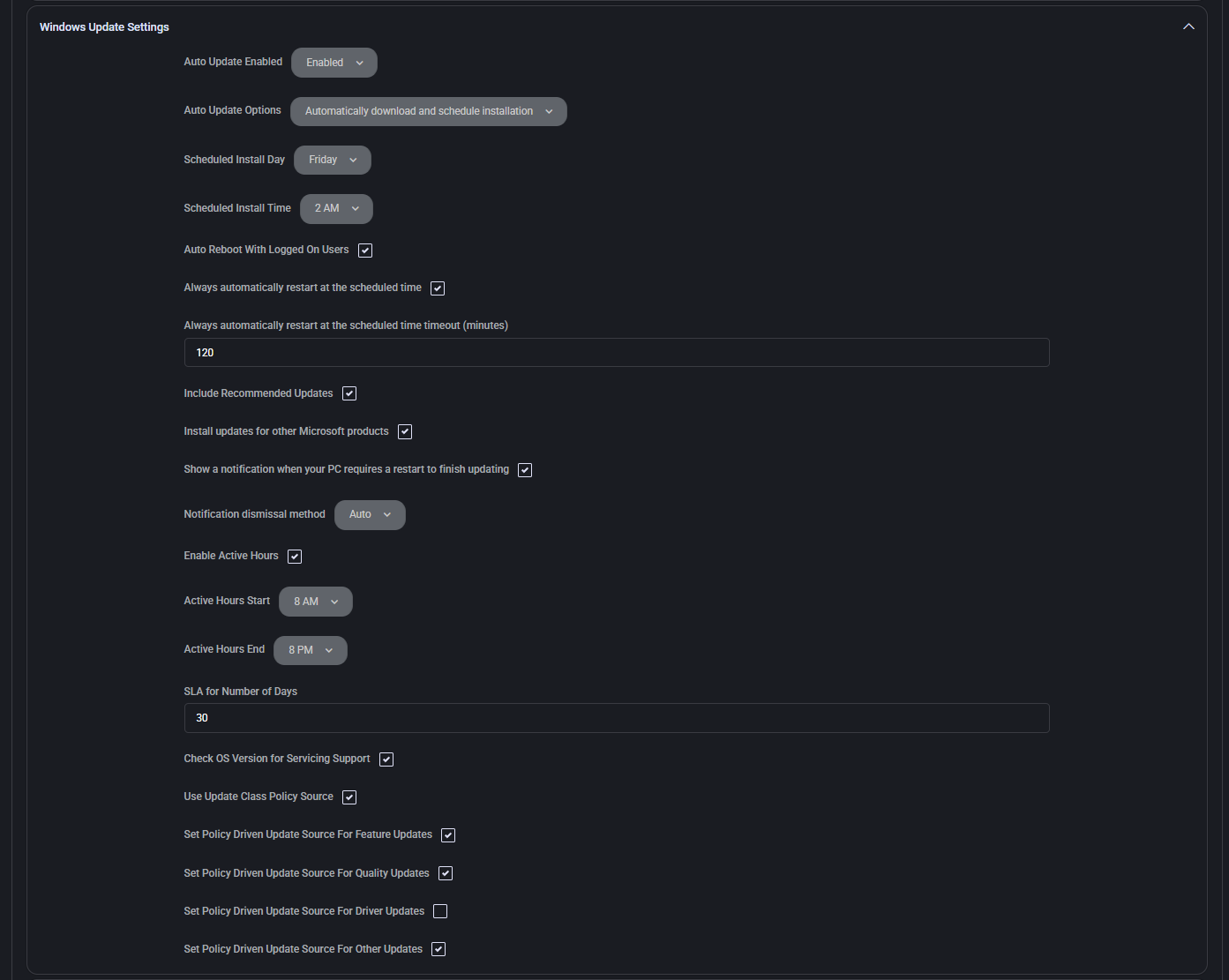
The MSPControl settings view includes installation timing, restart controls, active hours and update-source settings. Use a concrete pilot question: can a technician follow the device from policy review through an update request and verification?
An accepted command does not prove installation. Inspect device connectivity, task errors and the effective Windows policy before treating the job as complete.
Price the same scope: tenants, technicians, hosting, Microsoft subscriptions, backups, maintenance, support and adjacent tools. Include the RMM and documentation services you would retain alongside a Microsoft 365-focused portal. Broader scope can connect more workflows, but this comparison does not claim a measured saving.
Run a pilot that can change your decision
Choose a representative customer. Include its real license mix, technician roles, device enrollment and organization requirements. Establish a safe test environment and authorized actions.
Complete a tenant task and a device task. Review a baseline mismatch and a supported device action. Record the result, missing data, errors and any separate admin portal required.
Prove recovery and handover. Test the configuration objects you need to recover. If device and asset work matters, follow the record to the next technician rather than stopping at the first screen.
Assign automation ownership. Decide which tool controls each policy, schedule and incident action. Resolve conflicting writes before rollout and retain a rollback route.
Questions buyers ask
Is Microsoft 365 Lighthouse free?
Microsoft lists no additional charge for Lighthouse itself. Eligible partner access and the underlying Microsoft subscriptions, licenses and workload prerequisites still apply. Technician time and adjacent RMM, documentation or recovery services remain part of the operating cost.
Can a non-CSP use Microsoft 365 Lighthouse?
Lighthouse is available to CSP partners, including direct-bill partners and indirect resellers. The partner must qualify; its customers do not themselves need to enroll in CSP. Check the separate customer eligibility requirements before planning active management.
Does Lighthouse replace CIPP?
Only if its supported tasks cover your requirements. Test the standards, tenant actions, configuration recovery and integrations you depend on. CIPP offers its own Standards and Drift workflows and documented configuration backups; a Lighthouse deployment plan does not establish equivalent restore coverage.
Why evaluate MSPControl alongside Lighthouse and CIPP?
Evaluate MSPControl when the service also includes Windows Agent operations, patch work, asset documentation or supported infrastructure administration. That broader scope can connect more of the customer workflow, but it does not establish complete parity with either Microsoft 365 portal.
Are Azure Lighthouse and Microsoft 365 Lighthouse the same?
No. Azure Lighthouse concerns delegated management of Azure resources. This comparison covers Microsoft 365 Lighthouse. An Azure management requirement needs a separate evaluation.
Can more than one platform manage the same customer?
Plan ownership before combining tools. Assign one owner to each setting, scheduled action and incident workflow, review permissions, and test for conflicting automation. Do not assume that a successful connection makes overlapping write operations safe.