
Microsoft 365 management tools

Choose Microsoft 365 Management Tools Around the Work You Need Done

A longer feature list does not tell you whether a technician can finish the customer’s task. Compare administration, configuration control and security operations separately, then test the shortlist against the same real requirements.

For IT providers and Microsoft 365 administrators comparing tools, deployment models and operational responsibilities.

DefineChoose the customer jobs that matter most.

ShortlistMatch the tool’s scope to those jobs.

TestCheck permissions, outcomes and failure paths.

DecideCompare evidence and the full operating cost.

What Are the Best Microsoft 365 Management Tools?

There is no single best Microsoft 365 management tool for every team. Microsoft 365 Lighthouse, CIPP, MSPControl, CoreView Configuration Manager and Microsoft Defender multitenant management address overlapping but different needs. Start with tenant administration, configuration lifecycle or security investigation, then confirm coverage, access requirements and who operates the platform. The best fit is the one that passes your essential workflows with acceptable risk and cost.

Build a Shortlist by the Job Each Tool Needs to Do

These are concrete starting points, not a ranked or exhaustive market list. Published by MSPControl; official documentation reviewed on 21 September 2026. Vendor descriptions below are documented scope, not independent hands-on test results.

Microsoft 365 Lighthouse

Microsoft portal for eligible CSP customer operations

Microsoft documents multi-tenant views, customer deployment journeys, security baselines and service-health visibility. Check partner and customer eligibility, delegated access, licensing and service-specific prerequisites before treating a tenant as fully supported.

Ask the pilot to prove: Pilot the onboarding journey and one recurring administration task for each representative customer type.

Lighthouse overview · Current requirements

Compare Microsoft 365 Lighthouse, CIPP and MSPControl

CIPP

Microsoft 365 administration with hosted or self-hosted deployment

CIPP documents self-hosting in your Azure environment and a hosted subscription option. Its Standards and Drift workflows distinguish reporting, alerting, remediation and review of deviations. Confirm the behavior and available actions of each selected standard.

Ask the pilot to prove: Pilot a report-only template first, then inspect one authorized correction and its customer scope. Include hosting and maintenance in the cost comparison.

Deployment options · Standards and Drift

Compare MSPControl vs CIPP by workflow and operating model

MSPControl

Self-hosted customer administration and recurring operations

MSPControl combines supported Microsoft cloud administration with a wider operational platform. The documented subscription interface, user-license actions and configured security-compliance comparisons are distinct workflows. Review the exact supported scope below rather than assuming every operation is interchangeable.

Ask the pilot to prove: Pilot a customer-scoped user/license review, a supported baseline check and the associated task results. Include operation of your Windows and SQL infrastructure.

Platform overview · Deployment choices

CoreView Configuration Manager

Microsoft 365 configuration lifecycle

CoreView documents Configuration Manager as a SaaS module for reviewing tenant configurations, tracking drift, configuration backup and restoring desired state. Verify supported configuration objects and the package offered to your team; configuration recovery is not the same as mailbox or file recovery.

Ask the pilot to prove: Pilot a controlled configuration change and recovery of an explicitly supported object. Ask for the applicable coverage, retention and licensing terms.

Configuration Manager documentation

Microsoft Defender multitenant management

Security operations across connected tenants

Microsoft documents a multitenant Defender view for incident investigation and advanced hunting across accessible tenant data. Evaluate it for the security team’s investigation workflow, alongside the administration tools used by the service desk.

Ask the pilot to prove: Verify onboarding, access and relevant service licenses, then follow an authorized test incident through investigation. Do not score a SOC workflow as if it were a subscription-administration screen.

Defender multitenant overview

The operating workflow

Run the Same Pilot for Every Shortlisted Tool

Choose representative customer scenarios

Use an authorized test tenant and realistic differences in licensing, services and access. List the recurring jobs that consume time today. Mark the requirements that must pass before any weighted score can matter.

Prove the customer and permission boundary

Sign in as the intended technician role, select the customer and confirm the visible scope. Test read-only access and denied actions. Record delegated relationships, consent, roles and any per-tenant onboarding work.

Complete an everyday administration job

Review a user and subscription, then perform an approved reversible action in the test tenant. Record the clicks, waiting time, native-portal handoffs, task errors and final Microsoft-side state. A submitted request is not a completed change.

Test a mismatch and a failed request

Where supported, introduce an authorized test configuration difference and observe the next check. Try an unavailable permission or service safely. Confirm that missing data is distinguishable from a healthy result and that recovery steps are clear.

Follow the record through to the next technician

Check what the tool retains, how findings are exported or routed, and what still requires a ticket or external procedure. For AI-assisted work, inspect the source evidence, action scope and approval boundary instead of scoring fluent answers.

Price the operating model and exit

Include subscription fees, Microsoft licenses, infrastructure, maintenance, training, support and migration effort. Verify current commercial terms directly. Test export, access removal and the handover procedure before deciding.

Look Beyond the Screenshot to the Decision It Supports

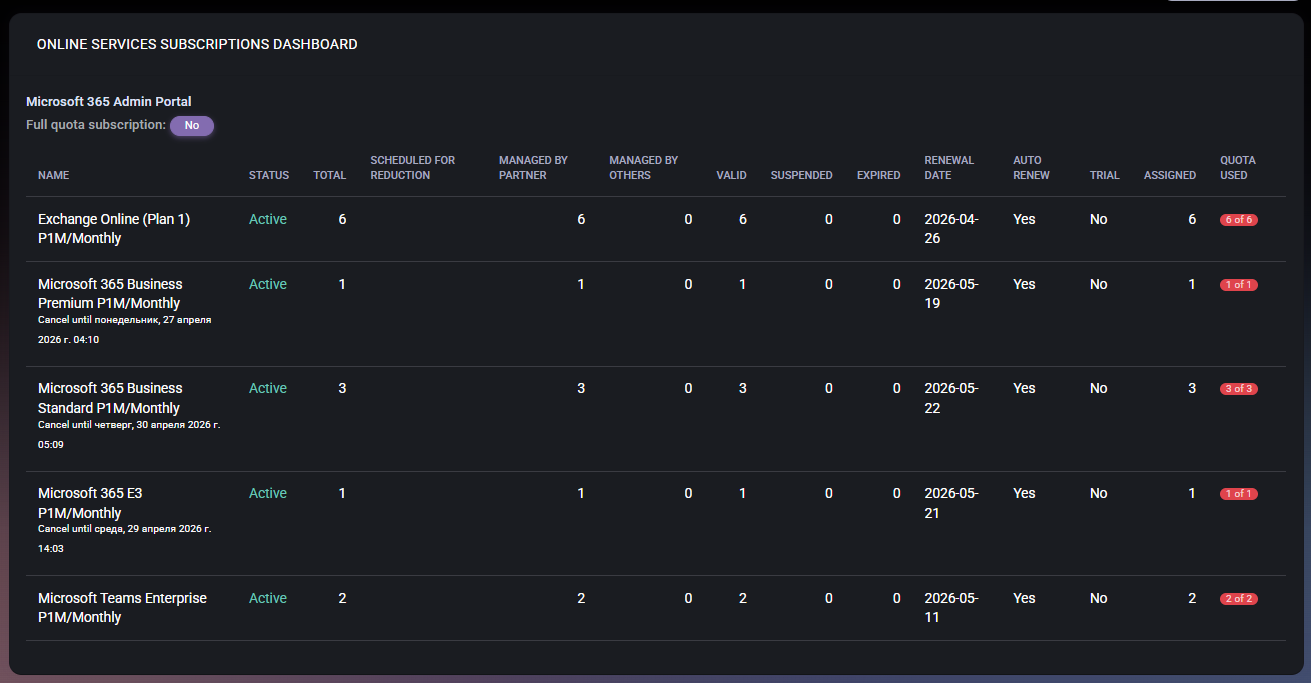
In MSPControl, this subscription view exposes quantities, status, renewal context and assignment counts. During your pilot, check whether these fields answer the customer’s question. To assess actual app activity or a seat reduction, you need separate usage evidence and subscription terms.

MSPControl Online Services Subscriptions Dashboard with populated quantities, status, renewal dates and assignment counts. Genuine documentation interface example from April 2026; not a live customer assessment or a workload-usage report.

What MSPControl supports

Put MSPControl Through the Same Tests

MSPControl is a self-hosted option for teams coordinating customer administration and recurring operations. Evaluate these supported workflows in your installed version; do not infer universal coverage from a product category.

Customer-scoped administration

Review the selected organization, connected services and user-license controls. Supported assignment actions and subscription visibility provide customer context; Microsoft permissions and service prerequisites still apply.

Subscription and activity evidence

Use the documented subscriptions dashboard for quantities, status and renewal context. Supported API/AI actions expose Microsoft workload activity reports separately. Check freshness and concealed identities before joining activity to assignments.

Supported baseline comparisons

The configured security-compliance workflow compares a defined set of controls with expected global or organization values. Some controls have optional correction paths; this is not a universal tenant configuration backup or rollback system.

Infrastructure under your control

Deploy on supported Windows Server infrastructure or into your own Azure subscription. Plan platform updates, backup, monitoring and recovery responsibilities. Azure Marketplace deployment does not turn MSPControl into a vendor-operated SaaS service.

Current boundary: This guide does not claim a one-click license savings engine, every Microsoft 365 action in one screen, complete configuration rollback or guaranteed security outcomes. API/AI report availability is not proof of a dedicated graphical dashboard or successful execution in every customer environment.

Interpretation and coverage

A Scorecard That Produces a Defensible Decision

Test area Evidence to keep Decision rule
Customer access and permissions Roles, tenant scope, consent and a denied-action result. Must pass your access and separation requirements.
Required daily workflow Completed steps, elapsed time, task result and native-service readback. Must complete the actual task, not just display the object.
Configuration control Compared objects, cadence, supported correction and recovery procedure. Score only the scope you tested; do not assume full rollback.
Reporting and AI assistance Reporting window, freshness, source records and missing-data behavior. Unusable or concealed data must not be reported as inactivity.
Deployment and support Operating owner, update process, backup/recovery test and support terms. Accept the responsibilities of SaaS or self-hosting explicitly.
Cost and portability Current quote, infrastructure estimate, labor assumptions and export test. Compare the same customer scope and term; record exclusions.

Continue the evaluation

Review the Scope, Deployment and Next Workflow

Common questions

Microsoft 365 management tools FAQ

Which Microsoft 365 management tool is best for an MSP?

Start with the work the MSP must deliver. Lighthouse is a Microsoft option for eligible CSP scenarios; CIPP and MSPControl cover customer administration with different operating models; CoreView Configuration Manager focuses on configuration lifecycle; Defender multitenant management serves security operations. Verify current coverage and pilot your critical jobs before choosing.

Is Microsoft 365 Lighthouse the same as Azure Lighthouse?

No. Microsoft 365 Lighthouse addresses Microsoft 365 customer management for eligible partners and tenants. Azure Lighthouse addresses delegated management of Azure resources. Confirm the service and access requirements for the problem you are solving.

Should we choose SaaS or self-hosted management software?

Choose based on operational ownership as well as features. SaaS shifts some platform operations to the vendor, subject to its terms and shared responsibilities. Self-hosting gives you infrastructure control but leaves deployment, updates, backup and recovery work with your team. Neither model removes the need for tenant permissions or verification.

Does a configuration backup also protect mailboxes and files?

Do not assume that it does. Configuration recovery and business-data backup are different requirements. Ask which objects and workloads are protected, what restoration actually restores, and how recovery is tested for each service.

Can an AI assistant replace the management workflow?

AI can help interpret available evidence and use supported actions, but its answer does not prove a change succeeded. Evaluate source visibility, customer scope, permissions, approval requirements, failure reporting and final service state. Test those boundaries just as you would a graphical workflow.

Is this an independent ranking of vendors?

No. This guide is published by MSPControl. It combines official product documentation with a practical evaluation framework and verified MSPControl implementation boundaries. It is not a hands-on benchmark of every vendor, an exhaustive market list or a numerical ranking.