
Distinguish the model types
The list separates Completion from Embedding and shows their default selections. They serve different tasks; choosing a default does not enable every ticket policy.
AI service-desk automation
Put VirtuBot to work on repetitive ticket classification, priority review, subject rewriting and board selection. Decide which fields it may change, then keep technicians responsible for the next action.
For service desks using MSPControl with ConnectWise. Requires configured VirtuBot services, model endpoints and the relevant ticket policies.
AI help desk automation uses language models to interpret service requests and assist with ticket handling. In MSPControl, VirtuBot provides configurable policies for classification, priority, ticket-subject rewriting, sentiment, duplicate handling and board selection around ConnectWise. Administrators scope the policies and permitted changes; technicians verify the result and resolve the underlying issue. It is not a replacement for the PSA or a promise of an autonomous service desk.
Review the configured completion and embedding models, then select the model needed by each supported policy.
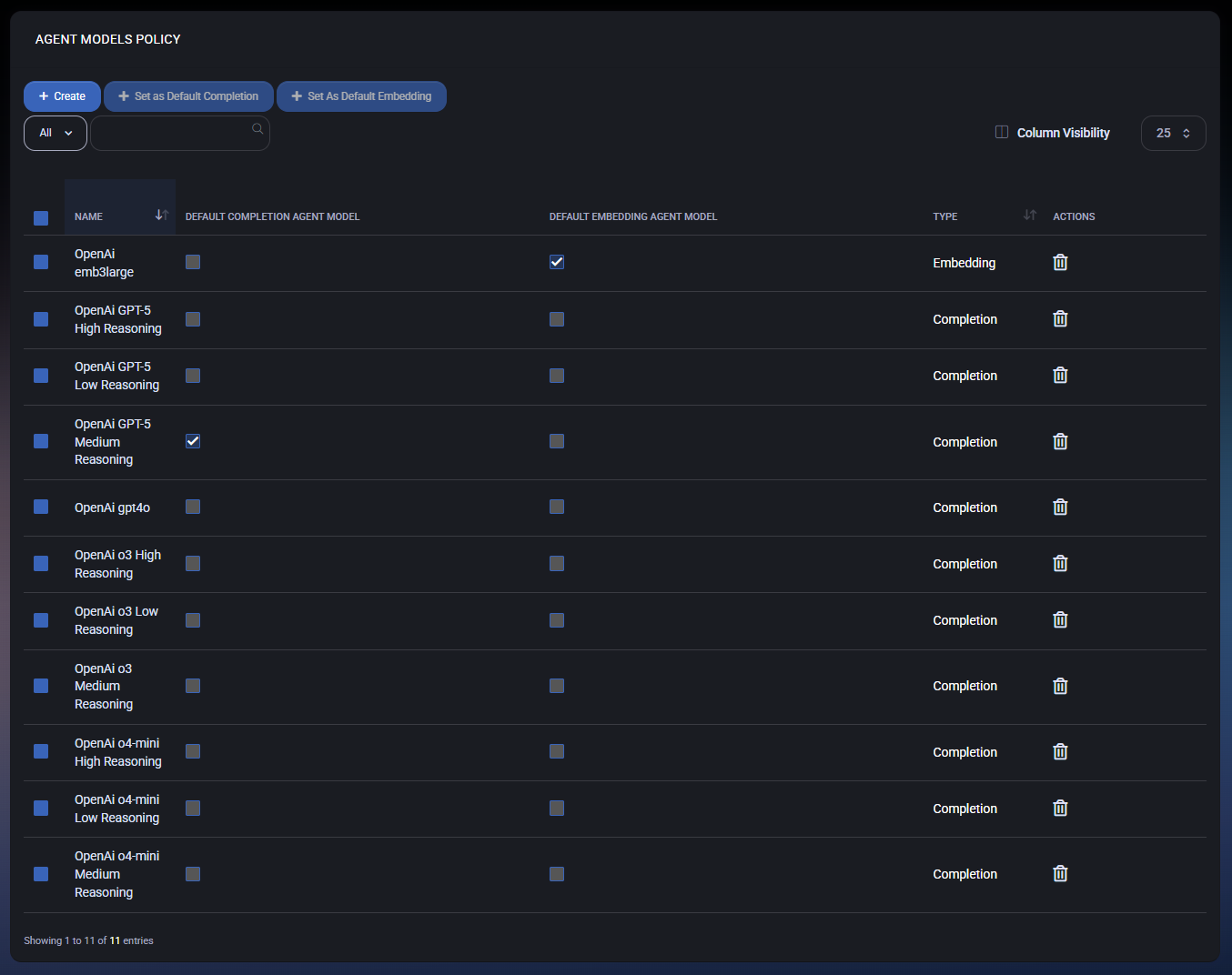
The list separates Completion from Embedding and shows their default selections. They serve different tasks; choosing a default does not enable every ticket policy.
Check the configured deployment and credentials without exposing them in ticket notes. Display names are local configuration labels, not a guarantee that a model is available in your environment.
Select the intended model in the relevant policy, test the scoped workflow and inspect errors before expanding. Available fields and model choices depend on your version and deployment.
The operating workflow
Confirm the ConnectWise integration, VirtuBot service configuration and the model endpoint required by the selected policy. Review search/index and messaging dependencies for the workflows you enable. A model name in a selector is not a connectivity test.
Start with a test board and representative fictional requests. Configure board scope and, where available, ignored or processed statuses. Keep a manual review path for ambiguous requests and processing errors.
Begin with a clearly defined task such as classification or a clearer ticket subject. Configure meaningful Unclassified values for taxonomy review. Evaluate the actual output before combining several processors.
Review the separate flags for changing classification, priority, ticket summary and service board. Configure notes and Teams notifications deliberately. Saving a policy is not evidence that the external ticket was updated.
Read the original request alongside the generated result. Confirm the customer, board, saved fields and responsible technician in ConnectWise. Review possible duplicates before relying on merge behavior; two similar reports can still be different incidents.
Track correction rate, manual triage time, wrong-board cases and missed follow-up using your own sample. Review errors and notification noise. Expand only when the observed results are acceptable to the service team.
What MSPControl supports
VirtuBot separates the analysis task from its permitted ticket changes. This lets administrators choose which parts of triage to automate and where to retain an explicit review step.
Configure Type, SubType and Item classification, fallback values, priority processing and supported board/status scope. Separate change flags control classification and priority updates.
Ticket Summary Rewrite has its own enablement, board scope, tag-preservation setting and summary-change flag. Here, summary means the ticket subject field, not a complete incident-history report.
Configure negative-sentiment notifications and thresholds. Duplicate policies expose separate detection, same-contact merge and same-customer parent/child options. Validate matching and exclusions with test tickets before permitting consolidation.
Service-board selection has separate processing and board-update controls. Use configured internal notes, Teams destinations and error notifications to support review; ownership and resolution still need verification.
Interpretation and coverage
| Service-desk problem | Relevant VirtuBot control | Review before relying on it |
|---|---|---|
| Requests arrive without useful categories | Ticket Classification and Unclassified fallback fields. | Whether Type, SubType and Item reflect the actual request; confirm permitted field changes. |
| Vague subjects slow queue review | Ticket Summary Rewrite. | The saved subject remains accurate and keeps required tags; it is not a full-history digest. |
| Urgent work is difficult to spot | Ticket Prioritizing and Ticket Sentiment. | Priority against business impact; sentiment against the original communication and customer context. |
| Tickets land on the wrong board | Ticket Service Board Selector and routing rules. | The actual ConnectWise board, valid customer mapping and an accountable owner. |
| Similar tickets create repeated work | Ticket Duplicate Detection and separately enabled consolidation options. | Same requester/customer and same issue, plus the resulting ticket relationship. Do not assume every similarity is a duplicate. |
| Nobody knows whether automation ran | Internal-note, Teams-notification and error controls. | Saved ticket state and task/application logs. Absence of a notification is not proof of success. |
Configuration and next actions
Common questions
VirtuBot provides configurable policies for ticket classification, priority, subject rewriting, sentiment notifications, duplicate handling and board selection. Each workflow needs its relevant services and settings. Verify actual ConnectWise changes and retain technician oversight.
No. These service-ticket workflows operate around a configured ConnectWise integration. MSPControl provides policy and customer context; ConnectWise remains the ticket system of record.
The documented control rewrites the ticket summary or subject field. It should not be treated as a complete incident timeline, a verified root-cause analysis or a digest of every note and attachment.
Relevant policies expose separate flags for changing classification, priority, summary and board. Enable only the changes you intend and test them with scoped requests. Notes and notifications have their own controls; a saved setting is not a confirmed ticket update.
The policy exposes duplicate detection, same-contact merge and same-customer parent/child controls. Enable and validate each intended action separately. Similar wording alone is not proof of a duplicate, and this page does not promise error-free merges or universal exclusions.
No. Sentiment is an interpretation of communication tone. A service manager should review the original request, customer context and business impact before treating it as an incident or escalation.
No. The reviewed model configuration uses external Azure OpenAI endpoints, and enabled workflows may also use search and messaging services. Review the configured providers, credentials, access and data-handling requirements before processing customer tickets.
Pilot one board and one policy at a time. Test clear, ambiguous and out-of-scope requests; compare generated output with the original and inspect saved ticket state. Track corrections, routing mistakes, manual effort and missed follow-up rather than assuming an accuracy or time-saving percentage.

Self-hosted. Free license available. No credit card required.