The Guest Users page in MSPControl is used to manage external users who have access to the Azure-connected organization as guest accounts. This page helps administrators review guest identities, check their sign-in details, control whether guest accounts are enabled or disabled, remove guest access when needed, and send guest-user reporting.
This section is especially useful for organizations that collaborate with external partners, contractors, vendors, or customer-side contacts. Instead of handling those accounts separately, MSPControl provides a dedicated page where guest access can be reviewed and managed in one place.
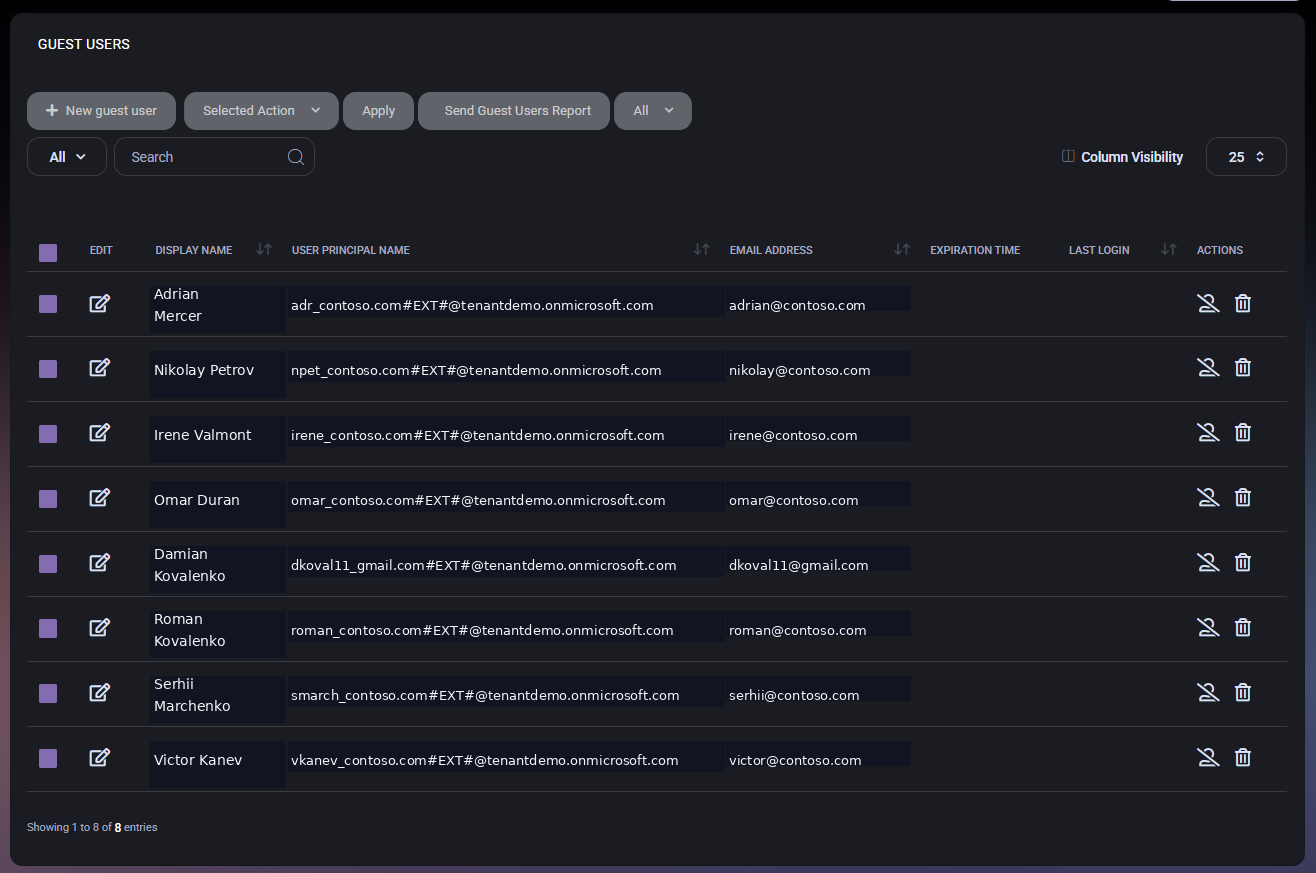
The Guest Users page acts as the central list of external Azure guest accounts associated with the organization. These are not standard internal users. They are guest identities that exist to support collaboration and controlled external access.
Because guest accounts often have different lifecycle and security expectations than internal users, this page is useful for periodic access review. It allows administrators to see who the guest users are, what their sign-in identifiers look like, whether they are still active, and what administrative actions can be taken against them.
The main Guest Users page displays all guest accounts in a table. The page includes controls for creating new guest users, running bulk actions, sending a guest users report, filtering the list, searching the table, and adjusting column visibility.
This page is useful for both day-to-day management and periodic governance review. Administrators can use it to confirm which external users currently exist, validate their identifiers, and quickly disable or delete accounts when guest access is no longer required.
This table is especially helpful because it combines identity, contact, and lifecycle information in one view, making external access review easier and faster.
The Selected Action dropdown allows administrators to apply the same operation to multiple guest accounts at once. In the screenshot provided, the available bulk actions are:
These bulk controls are useful when guest access must be cleaned up after a project ends, when accounts need to be suspended temporarily, or when several guest users must be reactivated together.
Because these actions can affect multiple external users at once, administrators should review selected rows carefully before clicking Apply.
The Actions column provides row-level controls for individual guest-user management.
These row-level actions are useful when only one guest account needs immediate attention and a bulk action would be unnecessary.
The User Principal Name values shown in the table reflect the Azure guest-user identity format. These identifiers often preserve the original external identity source and append the destination tenant naming pattern. This makes the column technically useful during troubleshooting and access validation, because it helps administrators distinguish guest identities from standard internal user accounts.
In practice, the Display Name and Email Address columns are usually easier for daily review, while the User Principal Name is more useful for technical verification and Azure-side consistency checks.
The Send Guest Users Report action is useful when administrators need a shareable or auditable overview of external access. This can support governance reviews, customer reporting, vendor access checks, or internal security validation.
Because guest users often represent third-party access into the environment, reporting on them is especially valuable during periodic access certification and cleanup exercises.
The Guest Users page gives MSPControl a dedicated place for external identity management inside the Azure section. This is important because guest accounts are operationally different from standard internal users. They often need separate review, different lifecycle handling, and tighter governance.
By keeping guest users in their own page, MSPControl makes it easier to review who still has outside access to the organization and to take action quickly when that access is no longer needed.

Self-hosted. Free license available. No credit card required.