MSPControl vs CIPP

MSPControl vs CIPP: Go Beyond Microsoft 365 Administration

Manage Microsoft 365, Windows workstations and servers, asset records and supported hosted infrastructure from one MSPControl platform. Compare that broader operating scope with CIPP’s Microsoft 365-focused approach.

Published by MSPControl. Feature comparison reviewed on 23 September 2026. Availability depends on supported versions, permissions, licensing and configured integrations.

Windows RMMManage connected workstations and servers.

Assets & documentationKeep operational records with the customer.

Microsoft 365Administer supported cloud services.

InfrastructureManage supported hosted environments.

What Is the Main Difference Between MSPControl and CIPP?

The clearest MSPControl advantage is broader operational coverage: a built-in Windows RMM agent, asset documentation and supported infrastructure administration alongside Microsoft 365. CIPP focuses on Microsoft 365 and Intune, with integrations for tools such as NinjaOne and Hudu. Both support tenant administration and compromise-response actions; choose based on the work you want the platform itself to own.

Compare Features Beyond Microsoft 365

Start with the work around the tenant. MSPControl includes Windows RMM, asset documentation and supported infrastructure administration in the same platform.

✓ Available× Not includedFor the feature named. Notes clarify integrations and scope.

MSPControl and CIPP feature comparison, reviewed 23 September 2026
Feature MSPControl CIPP
Devices & IT operations
Built-in Windows RMM agent AvailableWorkstations and servers Not includedIntune and external RMM integration
Windows Update actions through the platform’s own agent AvailableMonitor and install updates Not includedIntune policies are a separate workflow
ScreenConnect sessions from the device list AvailableIntegration required Not includedIntegration not available
Built-in asset records and lifecycle history AvailableOwnership, relationships and history Not includedHudu integration available
Built-in IT documentation linked to assets AvailablePasswords, certificates, notes and files Not includedDocumentation through external integrations
Hyper-V virtual server administration AvailableSupported Hyper-V providers Not includedOutside the Microsoft 365 management scope
Microsoft 365 & security
Microsoft 365 multi-tenant administration AvailableCustomer organization context AvailableTenant administration
User and license administration AvailableUsers, assignments and subscriptions AvailableUsers and license assignments
Intune device and policy management AvailableSupported device actions and templates AvailableIntune device and policy workflows
User offboarding actions AvailableSelected Disable User actions AvailableOffboarding Wizard
Compromise investigation and containment AvailableEvidence collection and configured VirtuBot controls AvailableCompromise Remediation
Scheduled security baseline checks AvailableDefined controls; limited optional correction AvailableStandards and drift workflows
Scheduled tenant configuration backup and selective restore Not includedIntune settings export/import only; not equivalent AvailableSupported configuration objects
Deployment
Self-hosted deployment AvailableWindows Server or your Azure subscription AvailableYour Azure environment
Installation on your own Windows Server infrastructure AvailableSupported Windows Server and SQL requirements Not includedDocumented self-hosting uses Azure
Vendor-hosted subscription Not includedYour team operates MSPControl AvailableCIPP hosted option

CIPP’s NinjaOne and Hudu integrations connect external products; they are not a built-in CIPP RMM agent or asset-documentation store. MSPControl’s ScreenConnect row also requires an external service. Neither column implies that every action is automatic or that every Microsoft workload is covered.

Compare Costs Without Mixing Unlike Plans

As reviewed on 22 September 2026, CIPP’s hosted quick start lists €99 per month. That is the hosted subscription, not a promise that Microsoft licensing, optional services or your administration work are included. Self-hosting has a different infrastructure and maintenance budget.

MSPControl’s published pricing lists a Free License with up to 3 technicians, 10 customers and 250 devices. Starter is $85 per technician per month, billed annually, with published capacity and professional support; other paid tiers have different limits. Check current terms and the plan needed for your full scope.

These are different currencies, billing bases and operating models, so the figures above are not a savings calculation. Ask for the applicable support terms, Microsoft requirements, hosting estimate and onboarding effort. Self-hosted MSPControl also connects to external services; owning the server does not mean every integration or AI request stays on that server.

The operating workflow

Prove the Fit Before You Change Platforms

Write down the jobs you cannot compromise on

Choose three to five recurring tasks: a user and license review, a leaver, a baseline mismatch, a configuration recovery or a suspected account compromise. Add a device or asset workflow if it matters to your service. Treat critical access and recovery requirements as pass/fail.

Connect an authorized test customer

Use the technician roles and customer types you actually support. Record consent, delegated access, required Microsoft licenses and connection steps. For MSPControl, verify the organization and provider prerequisites for your identity model; do not assume every workflow is AD-free.

Inspect results and deliberate failure paths

Complete approved, reversible test actions. Check task errors and effective Microsoft-side state, not only the confirmation message. Test denied access or an unavailable source safely. A blank result must not become evidence that everything is healthy.

Test recovery only for the promised objects

If configuration recovery is required, name the object, captured settings, restore mode and verification step. Keep mailbox and file recovery as separate tests. Exporting an Intune settings template is not proof that you can restore a whole tenant.

Calculate the cost for the same scope

Include software, hosting, Microsoft licensing, maintenance, backup, support, onboarding and operator time. Compare the same customer count, technician count, term and currency. Do not assume self-hosting is free to operate or that a hosted fee includes all adjacent services.

Plan a controlled handover

Inventory standards, scheduled jobs, permissions, alerts, integrations and recovery copies before replacing anything. Avoid two tools correcting the same setting without an agreed owner. Keep the old workflow available until the new one passes the required tests; then remove obsolete access deliberately.

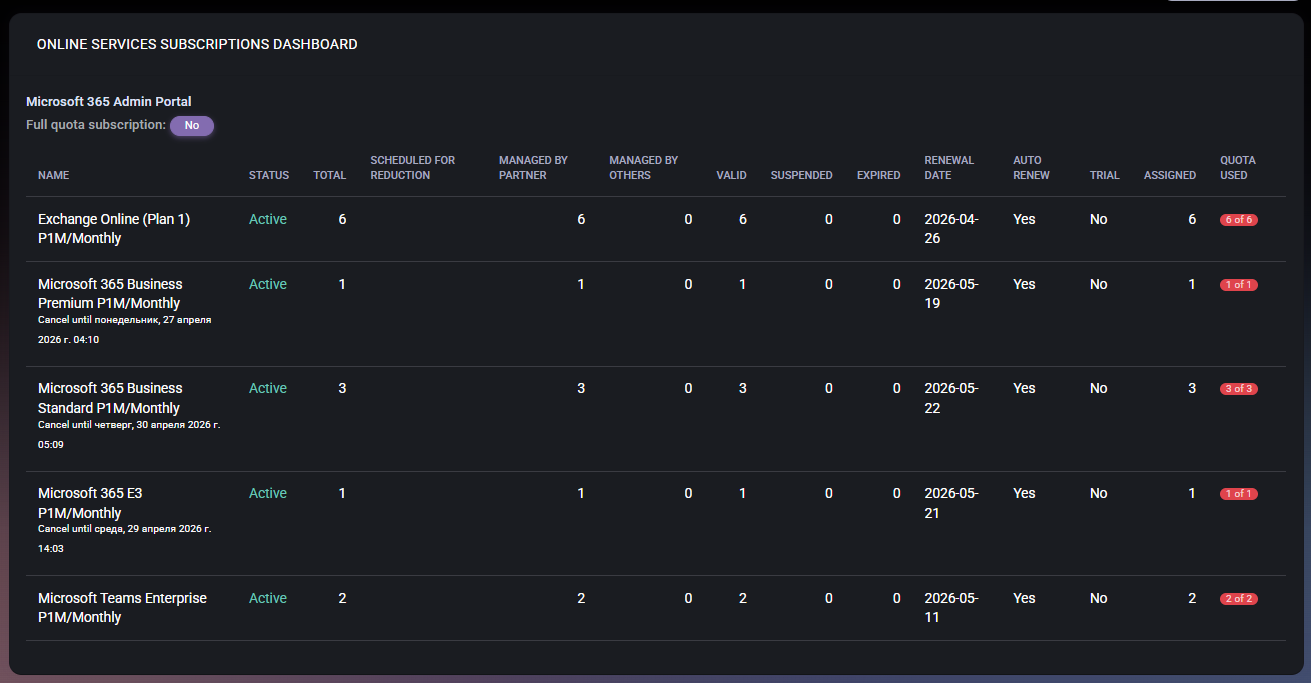
Test the Subscription Question a Technician Actually Gets

How many seats are assigned, when does the subscription renew, and which partner manages it? This MSPControl view exposes quantities, status, renewal context and assignment counts. It does not measure user activity or prove that a seat can be cancelled. Use the subscription dashboard guide to inspect the fields, then test the relevant commercial action separately.

Populated MSPControl Online Services Subscriptions Dashboard showing quantities, status, renewal dates and assignment counts. Genuine documentation interface example from April 2026, not a current customer assessment or a CIPP comparison test.

What MSPControl supports

When MSPControl Belongs on Your Shortlist

Evaluate MSPControl when Microsoft 365 administration is one part of the service you deliver. These capabilities provide concrete pilot scenarios rather than a claim that one product replaces every tool.

Customer context across recurring work

Review supported users, subscriptions and service settings within the selected organization. Then follow the task result and the next operating step instead of treating a portal action as a completed outcome.

Windows operations and asset records

The platform includes documented Windows Agent operations and asset records with relationships, notes and attachments. Test the particular device action or asset handover you need; these are not claims of universal endpoint coverage.

VirtuBot security workflows

MSPControl supports security evidence collection and configured VirtuBot containment controls. Policy exposes disabling a compromised user, revoking sessions and resetting a password, with separate test modes and evidence/confidence thresholds. Verify the deployed configuration and action results.

Infrastructure ownership

Run MSPControl on supported Windows Server infrastructure or in your Azure subscription. Your team remains responsible for operating the platform, including updates, SQL backup and recovery. Review data flows to Microsoft, AI providers and configured integrations separately.

Current boundary: MSPControl’s current baseline checks and supported Intune template import/export do not establish parity with CIPP’s complete documented configuration-backup workflow. A broader platform scope also does not prove that every CIPP action has an equivalent. Evaluate your installed version and required workflows.

Sources and next steps

Review the Product Scope Before Your Pilot

Common questions

MSPControl vs CIPP FAQ

Is MSPControl a CIPP alternative?

It can be a candidate when you need supported Microsoft 365 administration within a broader self-hosted operations platform. It is not a drop-in replacement for every CIPP workflow. Pilot the required actions, configuration recovery, integrations and identity prerequisites before deciding.

Is CIPP only available as self-hosted software?

No. CIPP documents both self-hosting in your Azure environment and a hosted subscription. Compare the relevant option with MSPControl’s self-hosted deployment rather than treating all three operating models as identical.

Which product is cheaper?

There is no defensible answer without a common scope. CIPP’s hosted subscription and MSPControl’s per-technician paid plans use different pricing models. Include current terms, infrastructure, Microsoft licenses, support and maintenance, and compare the same customer and technician requirements.

Do both products support security response?

Both document relevant capabilities. CIPP provides a Compromise Remediation workflow. MSPControl has security evidence collection and configured VirtuBot containment controls with test modes and thresholds. Compare the sources, permissions, actions and verification needed for your incident process rather than assuming exact parity.

Can an Intune export replace tenant configuration backup?

No. A settings export is limited to its supported objects and fields. It does not establish recovery of assignments, all Microsoft 365 configuration or business data. Validate the separate configuration-recovery and mailbox/file-recovery requirements.

Can we move CIPP policies into MSPControl automatically?

This comparison does not establish an automatic migration path. Inventory the existing configuration, map each requirement to a supported destination workflow, test it with an authorized customer and define a safe handover of scheduled actions and permissions.
