
Filter the platform record
Severity, dates, customer, organization, source and task help narrow the supported platform history.
Microsoft 365 audit log search
Collect supported Microsoft 365 audit activity into scheduled reports. Keep the customer, organization, time window and collection result visible as you investigate what changed.
For MSP administrators and security teams. Verify tenant auditing, application permissions, service configuration and available Microsoft data before interpreting a report.
Microsoft 365 audit log search helps investigators find recorded user and administrator activity in Microsoft services. MSPControl supports a scheduled Unified Audit Log report workflow: it queries eligible organizations separately and can assemble an administrator report with customer and organization context. Use Microsoft Purview for its interactive audit-search experience. The MSPControl Account Audit Log is a separate record of platform tasks and actions, not a viewer for the Microsoft unified audit log.
Use the Account Audit Log to review MSPControl actions and task context. The populated demo record below is a platform check-in, not a Microsoft 365 audit event.
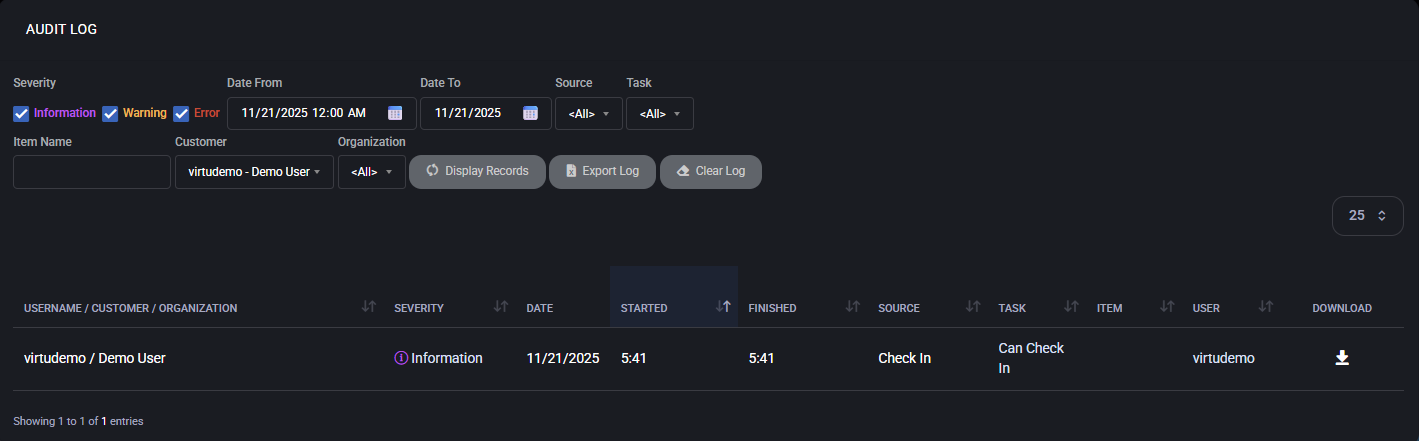
Severity, dates, customer, organization, source and task help narrow the supported platform history.
Inspect the record and available details. An informational entry alone does not prove successful collection from every Microsoft tenant.
Use the Microsoft 365 report or the selected tenant’s Microsoft tools for the service events themselves.
The operating workflow
Record the organization, affected identity or object, suspected activity and incident time. Decide whether the question concerns a Microsoft service action, an authentication attempt or an MSPControl task. Each needs the appropriate source.
Confirm Microsoft auditing and the relevant application permissions. Review the organization’s Microsoft service setup and report-notification configuration. Enabling MSPControl report notifications does not enable Microsoft auditing.
Set the scheduled task’s lookback in days, operation names and optional keywords. Enter operation names and keywords on separate lines. The keyword filter checks returned audit data; it is not the same search implementation as Purview. Keep time-zone assumptions explicit.
Review task history, organization-level warnings and errors. A query can fail, time out or return no data. Check which organizations were eligible and actually returned records; do not infer complete coverage from a sent email.
Use the administrator report’s customer and organization columns alongside the event date, operation, user and audit data. Follow up in the relevant Microsoft portal for the selected tenant. Correlate authentication evidence separately when investigating account access.
Record the source, time window, filters, collection status and relevant event identifiers in the incident record. Store exports using your approved evidence-handling process. A spreadsheet is not an immutable archive, and a scheduled lookback does not extend Microsoft retention.
What MSPControl supports
The supported workflow starts from a scoped scheduled task and retrieves data per eligible organization. Administrator and customer report delivery have separate configuration.
The report task processes organizations in its hosting-space scope. Microsoft requests remain tenant-specific; an administrator report can bring the returned records together with customer and organization labels.
The task configuration includes the lookback period, operation filters, keyword filters and duplicate removal. Keyword matching is applied to returned audit data. Review a representative result before narrowing the filter further.
The workflow generates Excel output. Administrator delivery uses the task recipient and enabled mail template; customer delivery depends on organization report settings and scheduling. Confirm receipt and content for the intended recipients.
Task history records the collection process, counts, warnings and errors. Use that operational evidence alongside the report to distinguish missing records from a failed or skipped source.
Interpretation and coverage
| Source | Useful for | Keep the distinction clear |
|---|---|---|
| Microsoft 365 unified audit activity | Recorded operations in supported Microsoft services, with available user, object and event data. | MSPControl collects eligible records into reports; Microsoft controls source availability and retention. |
| Microsoft Purview Audit | Interactive searches and investigation of a selected Microsoft tenant. | Its filters, permissions, job history and export behavior are Microsoft features, not automatically MSPControl UI features. |
| Microsoft Entra sign-in logs | Authentication attempts and associated sign-in context. | These are a separate source. A sign-in result is not a complete history of what the user did afterward. |
| MSPControl Account Audit Log | Platform actions and task execution context, including supported warnings and errors. | This does not replace the Microsoft unified audit log or prove that every external change was captured. |
| An exported audit report | A reviewable set of returned records for a particular run. | Record its scope and protect the file. Exporting does not change source retention or guarantee evidentiary completeness. |
Configuration and next actions
Common questions
MSPControl’s scheduled Unified Audit Log report queries eligible organizations separately and can combine returned records in an administrator Excel report with customer and organization columns. This page does not describe a global interactive search screen. Use the selected tenant’s Microsoft Purview Audit experience for ad-hoc searches.
The reviewed task screen includes lookback in days, operation names, keywords and duplicate removal. Operations and keywords are entered as separate lines. Keywords filter returned audit data; they are not equivalent to every Purview search filter.
No. MSPControl notification settings control reporting. Verify auditing and permissions in the Microsoft tenant separately, then validate the collection run and resulting records.
The source may have no matching activity, but missing configuration, disabled auditing, insufficient access, collection errors, event delays or restrictive filters can also explain the result. Inspect task warnings and verify the source before deciding that nothing happened.
No. Lookback selects a requested collection period. Searchable history depends on Microsoft licensing, event type, applicable policy and available records. Keeping a report file is a separate storage decision, not a change to tenant retention.
No. Account Audit Log records MSPControl platform activity and task context. Microsoft 365 unified audit activity and Entra sign-in logs are separate sources. Choose and correlate the sources that answer the investigation question.
No. Validate collection coverage and protect exports under your organization’s evidence-handling rules. This workflow does not promise immutability, universal event coverage or a compliance outcome.

Self-hosted. Free license available. No credit card required.