Azure Settings
The Azure Settings page in MSPControl is used to configure organization-level Azure and Microsoft 365 integration settings for the selected tenant. This page contains the core connection details for Azure AD, synchronization options, profile information, default address data, notification preferences, and bulk token settings used by the organization.
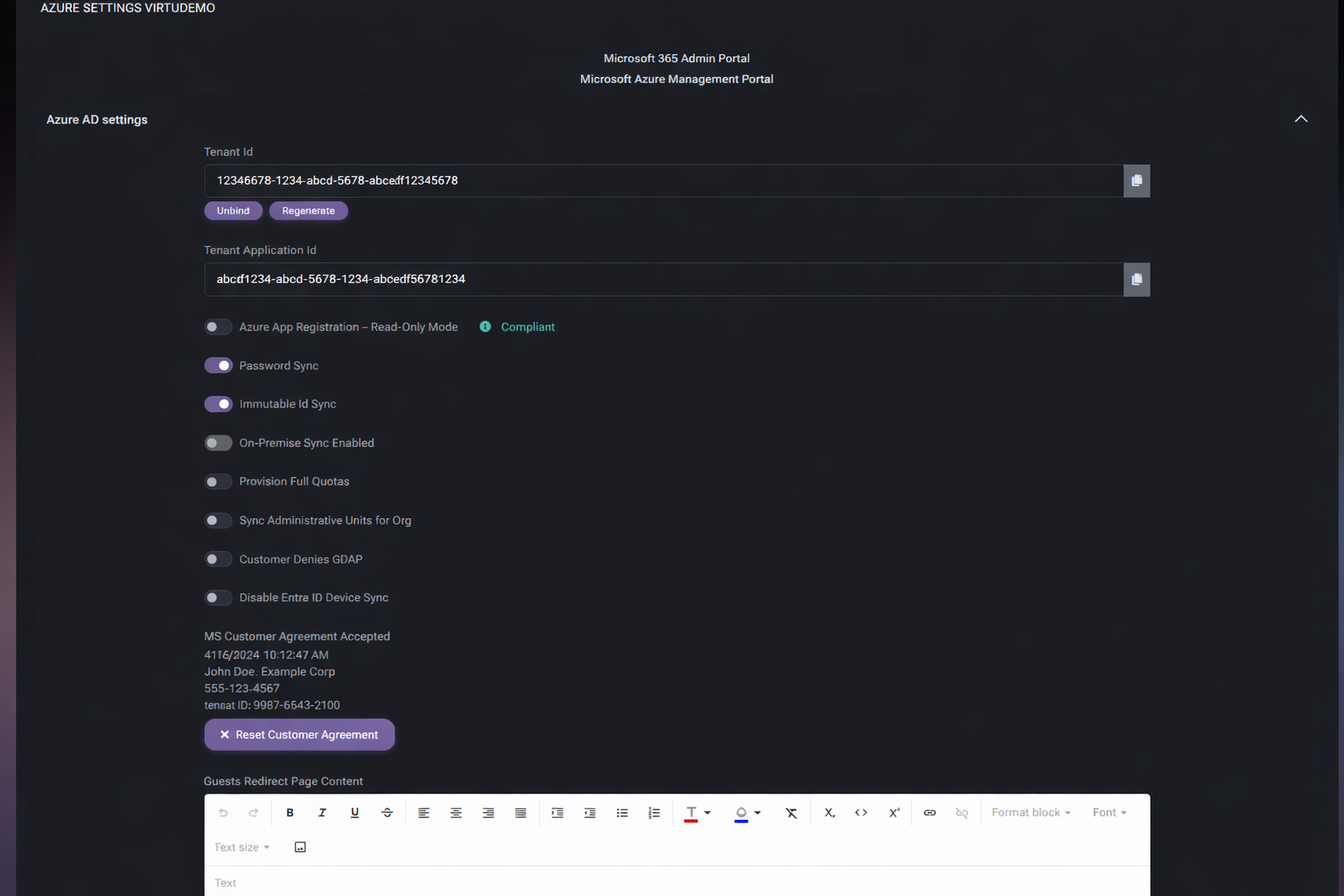
Because these settings affect how MSPControl communicates with Azure-related services and how organization data is presented or synchronized, this page should be treated as a high-impact configuration area. It combines technical tenant binding with operational profile and notification settings in one place.
Table of Contents
Azure Settings Overview
The Azure Settings page is structured into multiple collapsible sections. Each section focuses on a separate part of Azure-related tenant configuration, making it easier to manage both technical integration settings and organization profile data from one screen.
At the top of the page, MSPControl also provides quick links to the Microsoft 365 Admin Portal and the Microsoft Azure Management Portal. These shortcuts are useful when administrators need to move between MSPControl and Microsoft-managed portals while validating tenant configuration or troubleshooting integration behavior.
Azure AD Settings
The Azure AD settings section contains the primary Azure tenant binding and sync-related controls for the organization. These settings determine how MSPControl identifies the tenant and how specific Azure-related synchronization or provisioning behaviors are handled.
Azure AD Settings Fields
- Tenant Id stores the Azure tenant identifier associated with the organization. This is one of the key values used to bind the organization to the correct Azure environment.
- Unbind removes the current binding between MSPControl and the configured tenant. This should be used carefully because it affects the tenant relationship itself.
- Regenerate refreshes or recreates the tenant-related identifier value or connection logic associated with this field.
- Tenant Application Id stores the application identifier used for tenant integration.
- Azure App Registration – Read-Only Mode controls whether the Azure app registration should operate in read-only mode. In the screenshot, a Compliant status is also shown, which provides additional validation context for the current configuration.
- Password Sync controls whether password synchronization is enabled for the organization.
- Immutable Id Sync controls whether immutable ID synchronization is enabled.
- On-Premise Sync Enabled controls whether on-premise synchronization is enabled for the tenant.
- Provision Full Quotas controls whether full quota provisioning behavior is enabled.
- Sync Administrative Units for Org controls whether administrative units should be synchronized for the organization.
- Customer Denies GDAP indicates whether the customer denies GDAP-related access or behavior.
- Disable Entra ID Device Sync controls whether Entra ID device synchronization should be disabled.
- MS Customer Agreement Accepted shows the acceptance record for the Microsoft customer agreement, including time, person, email, phone number, and source IP. This is useful for tracking administrative consent history.
- Reset Customer Agreement resets the stored customer agreement acceptance state.
- Guests Redirect Page Content provides a rich text editor field where administrators can define the content shown for guest redirect scenarios.
- SharePointOnline/OneDrive Retention period defines the configured retention period for SharePoint Online and OneDrive content. In the example shown, the unit is Days.
- Change applies the updated retention period value.
This section is especially important because it contains the binding and synchronization controls that influence how MSPControl communicates with Azure AD and Microsoft 365 services.
Profile Info
The Profile Info section stores the basic organization profile values used in Azure-related configuration and tenant identity context.
- Company Name stores the organization or company name.
- First Name stores the primary contact first name.
- Last Name stores the primary contact last name.
- Email stores the main contact email address.
- Culture defines the tenant culture or locale setting.
- Language defines the language value used for the organization profile.
- Type defines the profile type. In the screenshot, the value is Organization.
These values help ensure the Azure-related tenant profile is complete and properly aligned with the organization’s administrative identity.
Default Address
The Default Address section stores the main address and contact details associated with the tenant profile.
- First Name stores the first name associated with the default address record.
- Last Name stores the last name associated with the default address record.
- Address Line 1 stores the primary address line.
- Address Line 2 stores the secondary address line.
- Phone Number stores the main phone number.
- City stores the city value.
- Country stores the country value.
- Region (State) stores the state or regional value.
- Postal Code stores the postal code.
This section is useful when tenant-related services or Microsoft-facing profile information depend on a complete and accurate default address.
Notification Settings
The Notification Settings section controls several Azure-related notification behaviors for the organization.
- Exclude Missing Azure AD users Notifications from ServerAdmin Report removes those notifications from the ServerAdmin report when enabled.
- Enable Missing Azure AD Users Notifications enables notifications about missing Azure AD users.
- Enable Sending Consumption Report enables consumption-report delivery behavior.
- Disable Budget/Suspension Notifications disables notifications related to budget or suspension events.
- AddressesToNotify stores the email addresses that should receive the configured notifications.
This section is useful for controlling who receives Azure-related alerts and which notification types should remain active for the organization.
Bulk Primary Refresh Token
The Bulk Primary Refresh Token section contains settings related to bulk refresh token use for the organization.
- Enabled controls whether the bulk primary refresh token feature is active.
- Token stores the refresh token value. The eye icon indicates that visibility control is available for this field.
- Expiration Date shows when the token expires.
- PackageUserUpn stores the package user UPN associated with the token.
- Valid status indicates whether the token is currently valid. In the screenshot, MSPControl also displays a message showing the token validity date.
- Run Health Checks starts validation or health-check actions for this token configuration.
- Download .ppkg downloads the related provisioning package file.
This section should be handled carefully because it includes sensitive authentication-related configuration that may affect provisioning or bulk Azure-related workflows.
Page Actions
- Save Changes and Exit saves the updated Azure settings and returns to the previous page.
- Save Changes saves the settings without leaving the page.
Because this page combines tenant identity, sync settings, profile data, notifications, and token configuration, administrators should review all changes carefully before saving.
Best Practices
- Verify the Tenant Id and Tenant Application Id carefully before changing any sync-related settings, since these values define the Azure tenant connection.
- Use Unbind and Regenerate carefully, because they affect the core tenant relationship and application configuration.
- Enable only the synchronization options that match the real environment, especially for Password Sync, Immutable Id Sync, and On-Premise Sync Enabled.
- Keep the MS Customer Agreement Accepted information intact unless there is a real need to reset it.
- Review Guests Redirect Page Content carefully so guest-facing messaging stays accurate and appropriate.
- Make sure Profile Info and Default Address remain complete and accurate, since these values may affect tenant-facing identity and administrative records.
- Use Notification Settings to reduce unnecessary noise, but do not disable important alerts without understanding the operational impact.
- Treat the Bulk Primary Refresh Token section as sensitive administrative data and limit changes to trusted administrators only.