
Name the term
The list shows each term name and its number of days. Keep the selected term consistent with the customer agreement.
MSP billing automation
Keep subscription plans, add-ons, billing dates, invoices and payment records in customer context. Automate supported recurring processing, then reconcile the result before closing the month.
For MSP administrators and billing teams. Available actions depend on the installed version, ecommerce configuration, payment profile and connected services.
MSP billing automation connects recurring service subscriptions to charge, invoice and payment processing. In MSPControl, the ecommerce subsystem provides plans and add-ons, billing terms, payment profiles, transactions and scheduled charge processing. A configured ConnectWise payment profile supports an external invoice path; supported Azure consumption invoices have a separate processing path. Reconciliation remains an operating responsibility: service usage, the commercial subscription, the invoice and the payment must agree.
Give the billing team a consistent set of payment terms to review alongside the subscription and payment route.
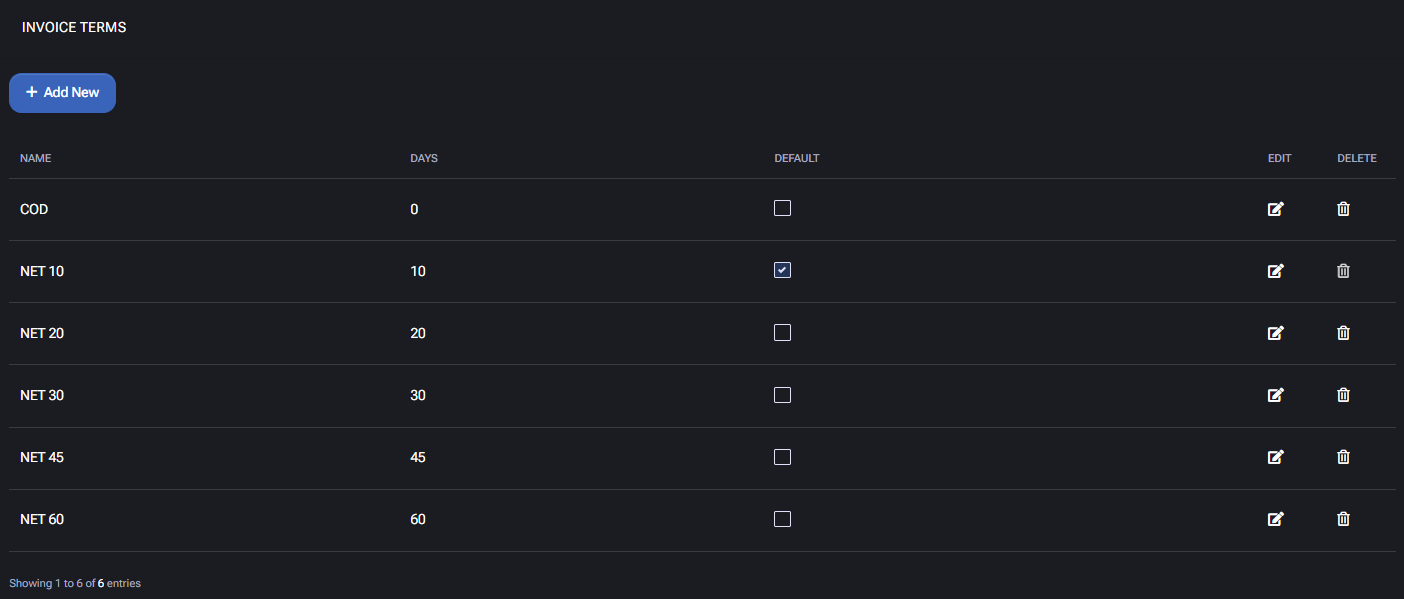
The list shows each term name and its number of days. Keep the selected term consistent with the customer agreement.
A default is a configuration choice, not a recommended term for every customer. Check the value applied to the customer record.
Inspect the generated invoice and due date. The term does not guarantee payment or settle an outstanding balance.
The operating workflow
Confirm the customer account, hosting space, subscription and payment profile. For ConnectWise invoicing, verify the customer-company and product mappings. Decide which system owns invoice collection and accounting before enabling a second billing route.
Review the plan, add-ons, quantities, prices and billing term against the customer agreement. Distinguish monthly payment from annual commitment. Verify start dates, renewal timing and any intended proration in your installed version.
Choose invoice terms, review invoice messages and confirm notification destinations. Configure payment providers and credit settings only for the intended environment. A due date is not proof that a payment will be collected.
Review the Ecommerce Charge task and its execution history. Where supported, ConnectWise pre-bill and Bill Thru settings affect invoice timing; they do not mean every usage source is included. Use an authorized test environment before processing real customer charges.
Compare the source service or usage record, subscription quantity and period, resulting invoice lines, and payment or open balance. Investigate missing mappings, unexpected quantities, duplicate lines and task errors. Check Azure consumption separately from fixed recurring fees.
Inspect new add-ons, term changes, cancellations, reactivations, refunds and adjustments. Record why a correction was made and verify its transaction. Check the next billing date and the downstream invoice after the change.
What MSPControl supports
MSPControl combines the commercial record with customer and service context. Each integration still needs correct configuration and an explicit reconciliation process.
Review recurring subscriptions, associated add-ons, terms, quantities, prices and next billing dates. Supported lifecycle screens cover term changes, cancellation, reactivation, adjustments and refunds, subject to permissions and policy.
The Ecommerce Charge workflow processes eligible subscriptions, creates invoices and follows the configured payment route. Inspect task errors and actual transactions; a completed schedule alone does not establish that every customer was billed successfully.
A subscription with a ConnectWise payment profile can create a ConnectWise invoice through the configured integration. Azure consumption invoices are handled separately and require the relevant subscription and commercial mapping.
The Subscriptions area exposes payment profiles, transactions, credit settings, open invoices, balances and next billing information. Use these records to distinguish an outstanding invoice from a collected payment or a manual correction.
Interpretation and coverage
| Record to review | What it tells you | What still needs verification |
|---|---|---|
| Service or usage source | The customer service, licensed capacity or reported consumption. | Customer mapping, reporting period, data freshness and whether a billable commercial record exists. |
| MSPControl subscription | Plan, add-on, quantity, price, term and billing schedule. | The agreement and provider commitment match; an assigned license count is not automatically a reduced supplier bill. |
| Invoice and transaction | What charges were recorded and, where configured, sent to ConnectWise. | Correct customer, products, amounts, periods and absence of duplicate or missing lines. |
| Payment or open balance | Whether a payment record exists or an amount remains due. | Processor result, settlement or evidence of an offline payment; an adjustment alone does not move funds. |
| Cancellation or reactivation | A change to the recurring commercial relationship. | Effective timing, add-ons, service consequences, possible immediate charge and continuing external cloud costs. |
Configuration and next actions
Common questions
Yes. Its ecommerce subsystem supports recurring subscriptions and a scheduled charge workflow that processes eligible records, invoices and configured payment routes. Enable and validate the required services, plans, payment profiles and schedule. Check actual invoices and transactions rather than assuming every scheduled run succeeded.
The reviewed implementation includes a ConnectWise invoice path for subscriptions using a ConnectWise payment profile. Correct integration, customer-company and product mappings are required. Confirm the invoice in ConnectWise; creating an invoice is not the same as collecting payment.
No. The charge workflow contains separate paths for recurring subscription charges and Azure consumption invoices. Verify the Azure source period, subscription association and commercial mapping independently. A cost dashboard does not prove that consumption reached the customer invoice.
Removing an assignment and reducing purchased subscription quantity are separate changes. Confirm the provider commitment, permitted change window and resulting commercial record before expecting the invoice to change.
No. This page describes the verified MSPControl ecommerce workflow and configured ConnectWise invoice path. It does not claim universal distributor reconciliation, automatic capture of all technician time or integration with every accounting product. WHMCS follows a separate documented module workflow.
An offline payment records money received elsewhere. A balance adjustment changes the recorded balance without collecting funds. A refund and a new payment are separate actions with their own financial effects. Verify the original transaction before choosing an action.
Review the effective quantity, price, term, next billing date, attached add-ons and payment profile. Inspect any immediate charge or refund and the downstream invoice. Cancellation can affect service availability; confirm continuing Microsoft or other provider commitments separately.
Choose one representative test customer and one billing route. Map the source service to its subscription and invoice, confirm the payment result, then test changes and failure handling. Expand only after the billing team can explain and reconcile each outcome.

Self-hosted. Free license available. No credit card required.