General Settings
The General Settings page in MSPControl is used to configure organization-wide behavior for notifications, archives, synchronization, integrations, reporting, automation, and other tenant-level options. This page acts as a central policy layer for the selected organization, allowing administrators to define how the organization should behave across multiple modules instead of configuring each behavior separately in different areas.
Because these settings affect broad operational behavior, this page should be reviewed carefully before changes are saved. Some options control reporting and user management behavior, while others define how the organization interacts with external systems such as ConnectWise, ManageEngine ServiceDesk Plus, Azure storage, automation workflows, and synchronization services.
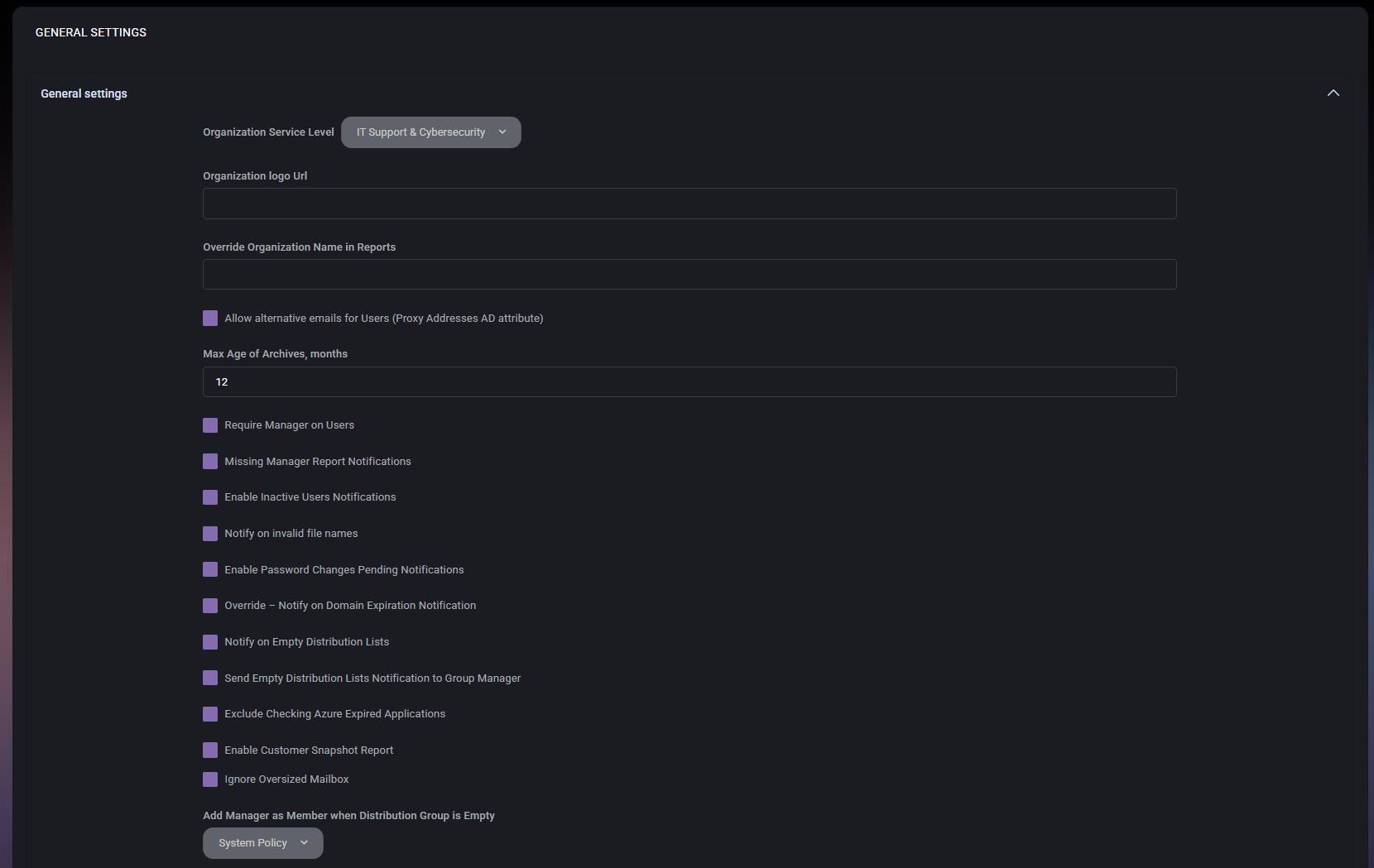
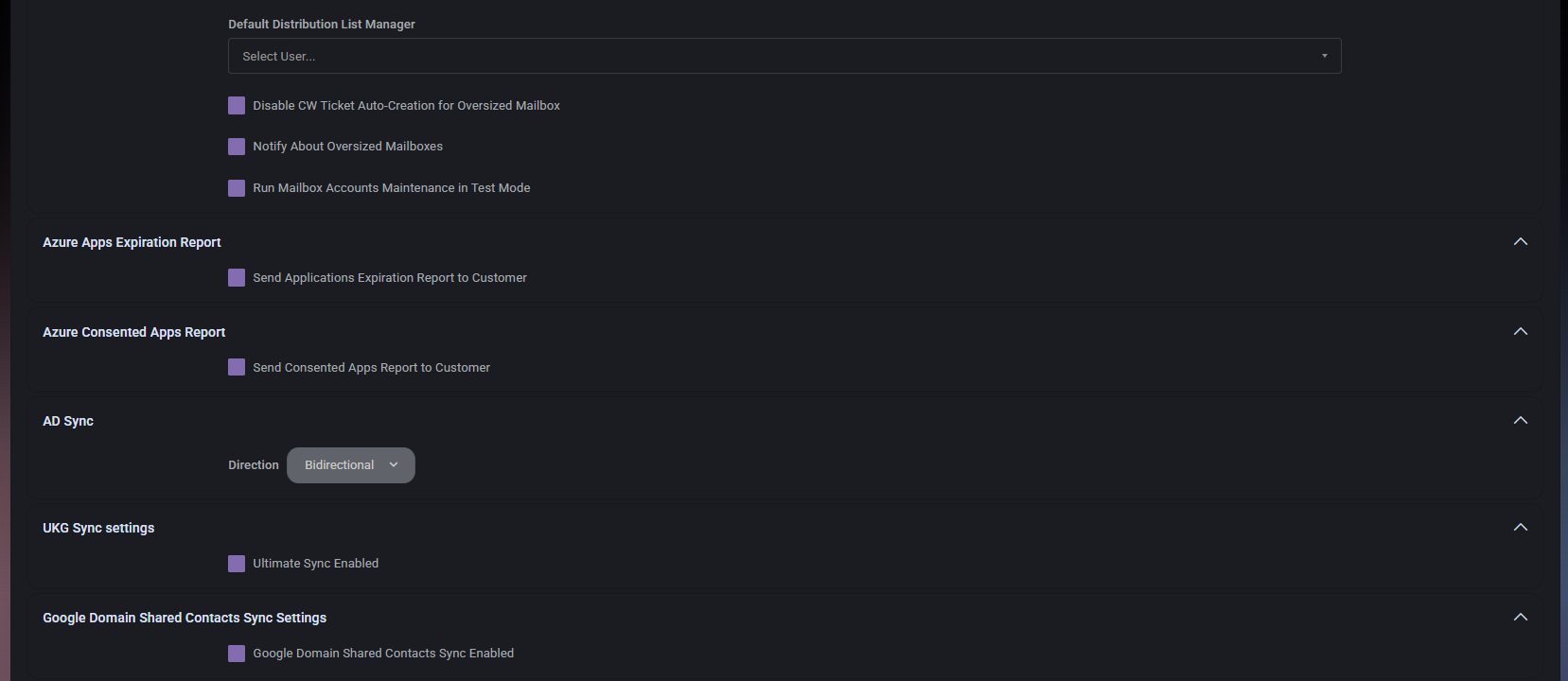
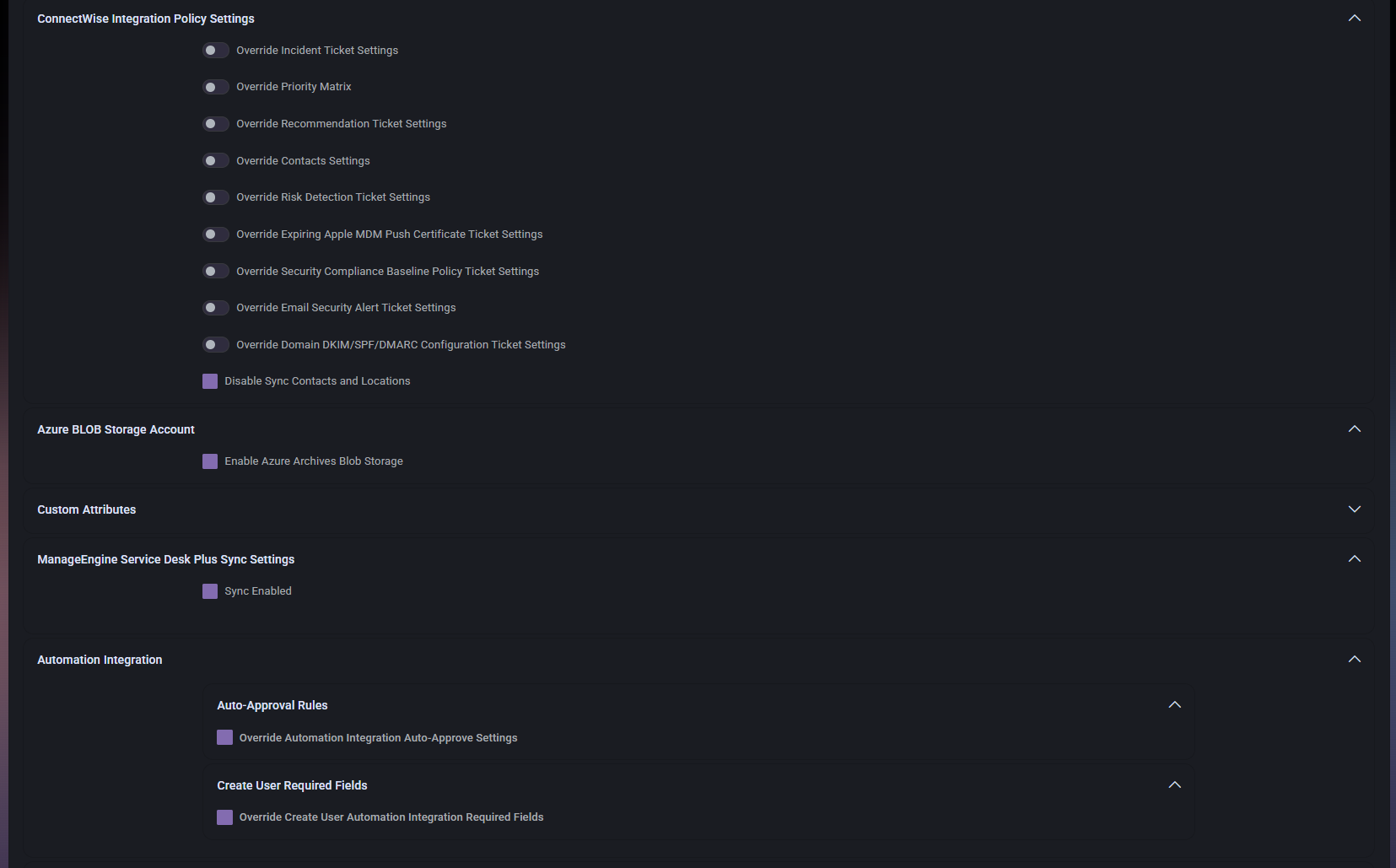

Table of Contents
General Settings Overview
The General Settings page is structured into multiple collapsible sections. Each section groups related settings so administrators can focus on one policy area at a time. This layout is especially useful for organizations with complex operational requirements, because it keeps tenant-wide settings organized even when many options are enabled.
Some settings affect internal MSPControl behavior only, while others change how the organization interacts with connected services, notifications, reports, and automation rules. Since this page mixes operational, reporting, and integration controls, it is best treated as a high-impact administrative configuration area.
General Settings Section
The main General settings section contains core organization-level options that affect retention, service classification, reporting labels, mailbox behavior, notifications, and manager-related policies.
Core Fields and Options
- Organization Service Level defines the service classification assigned to the organization. This can be used to reflect support tier, commercial package, or operational grouping. It is useful when different customers or business units receive different levels of service.
- Organization logo Url allows the administrator to specify the logo resource used for the organization. This may be useful in branding-related output, customer-facing content, or report presentation where organization-specific identity should be shown.
- Override Organization Name in Reports allows administrators to specify an alternative name that should appear in reports instead of the default organization name. This is useful when reporting needs to follow customer-facing branding or a different legal or commercial naming convention.
- Allow alternative emails for Users (Proxy Addresses AD attribute) enables support for alternative email addresses associated with users, using proxy address information from directory attributes. This is important in environments where users operate with aliases or multiple accepted email identities.
- Max Age of Archives, months defines how long archive data should be retained before it becomes too old according to the configured retention window. This setting is important for balancing historical visibility with storage management and retention policy requirements.
- Require Manager on Users enforces the expectation that user records should include a manager assignment. This is useful in organizations where manager relationships are required for workflows, approvals, notifications, or reporting.
- Missing Manager Report Notifications enables notifications related to users who do not have a manager assigned. This helps administrators identify incomplete data that may affect workflows or reporting accuracy.
- Enable Inactive Users Notifications enables alerts related to inactive user accounts. This is useful for operational review, cleanup activity, or identifying accounts that may need to be disabled, archived, or investigated.
- Notify on invalid file names enables notifications when invalid naming is detected in file-related scenarios. This can help organizations identify file naming issues that may break policy, automation, or compatibility requirements.
- Enable Password Changes Pending Notifications enables notifications related to pending password change situations. This is useful when administrators need visibility into accounts that still require password updates.
- Override – Notify on Domain Expiration Notification overrides the standard behavior for domain expiration notifications. This is relevant when the organization needs its own notification logic rather than relying on default policy behavior.
- Notify on Empty Distribution Lists enables alerts for distribution lists that do not contain members. This helps identify misconfigured or unused communication groups.
- Send Empty Distribution Lists Notification to Group Manager sends those empty distribution list notifications specifically to the group manager. This is useful when responsibility for list maintenance should remain with the business owner rather than with the global administrator.
- Exclude Checking Azure Expired Applications disables or excludes checking for expired Azure applications. This can be useful in environments where that check is intentionally not required, handled elsewhere, or would create unnecessary noise.
- Enable Customer Snapshot Report enables generation or delivery of customer snapshot reporting. This is useful when the organization wants periodic summarized visibility into tenant state, configuration, or service posture.
- Ignore Oversized Mailbox excludes oversized mailbox situations from standard handling logic. This should be used carefully because it can reduce visibility into mailbox growth problems.
- Add Manager as Member when Distribution Group is Empty defines what MSPControl should do when a distribution group has no members. The available selection controls the fallback behavior, such as using a policy-driven rule.
- Default Distribution List Manager allows the administrator to define a default user who should act as the manager for distribution list scenarios when no more specific manager is available. This is useful for consistent ownership and notification routing.
- Disable CW Ticket Auto-Creation for Oversized Mailbox prevents automatic ConnectWise ticket creation when oversized mailbox situations are detected. This is useful if the organization prefers manual handling or separate operational workflows.
- Notify About Oversized Mailboxes enables notification logic for oversized mailbox conditions so administrators or stakeholders are informed of mailbox growth issues.
- Run Mailbox Accounts Maintenance in Test Mode runs mailbox account maintenance behavior in a test-oriented mode. This is useful when administrators want to validate behavior without applying full production actions.
Azure Apps Expiration Report
This section controls whether Azure application expiration reporting should be sent to the customer.
- Send Applications Expiration Report to Customer enables sending a report about Azure application expirations to the customer. This is useful when the organization wants customer-facing visibility into app credentials or registrations that are approaching expiration.
Azure Consented Apps Report
This section controls whether consented Azure applications reporting should be sent to the customer.
- Send Consented Apps Report to Customer enables sending a report about consented applications to the customer. This is useful for visibility into third-party or internal applications that have been granted permissions in the tenant.
AD Sync
The AD Sync section controls directory synchronization direction for the organization.
- Direction defines the synchronization direction used for Active Directory-related operations. In the example shown, the value is Bidirectional, which suggests that data can move in both directions between connected systems. This setting should be reviewed carefully because synchronization direction affects how changes propagate.
UKG Sync Settings
This section controls whether UKG synchronization is enabled for the organization.
- Ultimate Sync Enabled enables UKG-related synchronization. This should only be enabled when the organization uses the connected UKG integration and expects data exchange through that sync path.
Google Domain Shared Contacts Sync Settings
This section controls synchronization behavior for Google shared contacts at the domain level.
- Google Domain Shared Contacts Sync Enabled enables synchronization of Google domain shared contacts. This is useful in environments where Google Workspace shared contact visibility must remain aligned with MSPControl-managed data or related systems.
ConnectWise Integration Policy Settings
The ConnectWise Integration Policy Settings section controls whether organization-level overrides should be used instead of broader default policies for ConnectWise-related ticketing and integration behavior.
- Override Incident Ticket Settings enables organization-specific incident ticket behavior.
- Override Priority Matrix enables a custom priority matrix for this organization instead of using the default policy.
- Override Recommendation Ticket Settings enables organization-specific recommendation ticket behavior.
- Override Contacts Settings allows contact-related integration settings to be overridden for this organization.
- Override Risk Detection Ticket Settings enables organization-specific settings for risk detection ticket handling.
- Override Expiring Apple MDM Push Certificate Ticket Settings enables custom ticket behavior for expiring Apple MDM push certificate scenarios.
- Override Security Compliance Baseline Policy Ticket Settings enables this organization to use its own ticket settings for security compliance baseline policy events.
- Override Email Security Alert Ticket Settings enables custom ConnectWise ticket settings for email security alert scenarios.
- Override Domain DKIM/SPF/DMARC Configuration Ticket Settings enables organization-specific ticket settings for domain email authentication configuration issues.
- Disable Sync Contacts and Locations disables synchronization of contacts and locations with ConnectWise for this organization. This is useful when sync should be restricted or handled manually.
These settings are important when one organization needs different ConnectWise handling than the standard policy applied elsewhere in MSPControl.
Azure BLOB Storage Account
This section controls Azure archive storage usage.
- Enable Azure Archives Blob Storage enables the use of Azure BLOB storage for archive-related data. This is relevant when the organization wants archive storage to rely on Azure-backed storage instead of only local or default handling.
Custom Attributes
The Custom Attributes section is present as its own collapsible area. Based on the screenshot provided, the section is currently collapsed and its internal fields are not visible. This means the page includes a dedicated place for custom attribute-related configuration, but the specific available options are not shown in the current capture.
ManageEngine Service Desk Plus Sync Settings
This section controls whether ManageEngine ServiceDesk Plus synchronization is enabled for the organization.
- Sync Enabled enables synchronization with ManageEngine ServiceDesk Plus. This should be used only when the organization actively relies on that integration for data exchange or service desk coordination.
Automation Integration
The Automation Integration section contains nested policy areas that define how automation-specific organization overrides should behave.
Auto-Approval Rules
- Override Automation Integration Auto-Approve Settings enables organization-level override behavior for automation auto-approval rules. This is useful when the organization needs more or less restrictive approval handling than the default automation policy.
Create User Required Fields
- Override Create User Automation Integration Required Fields enables an organization-specific override for the fields required during automated user creation. This is useful when one tenant has stricter or different provisioning data requirements than the global default.
Tenant-to-Tenant Migration
This section controls migration-mode behavior for organization moves between tenants.
- Org Migration Mode enables or marks the organization as operating in migration mode. This setting should be used carefully because it may affect how MSPControl treats the organization during tenant-to-tenant transition activities.
Page Actions
- Cancel closes the page without saving the current changes.
- Save Changes applies the modified settings to the organization.
Because many of these options affect broad behavior, administrators should review all modified sections carefully before selecting Save Changes.
Best Practices
- Review organization-wide settings in this page after onboarding a new tenant, because this is one of the main places where operational behavior is shaped.
- Change retention, notification, and synchronization settings carefully, since they can affect reporting volume, workflow expectations, and data handling across multiple modules.
- Use organization-specific overrides only when the tenant truly needs different behavior from the default policy, especially for ConnectWise and automation-related settings.
- Verify manager-related settings if the organization relies on approval chains, escalation paths, or ownership-based notifications.
- Be cautious with options that suppress checks or alerts, such as ignoring oversized mailboxes or excluding Azure expired application checks, because they can reduce operational visibility.
- Confirm integration-related settings with the teams responsible for external platforms before enabling sync or override options.
- Use test-oriented options, such as mailbox maintenance test mode, when validating behavior before switching to full production handling.
- Document non-default settings for each organization, especially when one tenant has special reporting, automation, or ticketing requirements.