IP Addresses
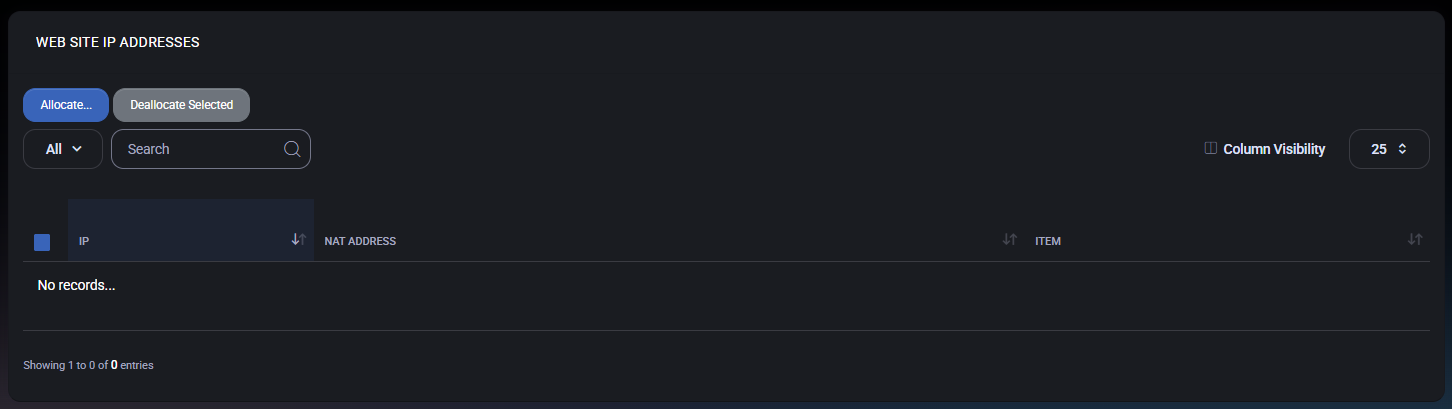
The IP Addresses page is used to manage IP address assignments for your organization’s hosted web services. Here you can allocate available IPs to websites (or related web items) and deallocate IPs that are no longer needed.
Admin note: IP availability
Important: The Allocate list only shows IP addresses that are made available by the platform administrator. If you do not see any IPs available for allocation, an administrator must first add IP addresses to the relevant server/service so they become available to customers in MSPControl.
Page actions
- Allocate… – Opens the allocation flow to assign one or more available IP addresses.
- Deallocate Selected – Removes the assignment for the selected IP address entries, returning them back to the available pool (if permitted by the hosting configuration).
Filters and search
- All – Scope selector for filtering the list (depends on your UI configuration).
- Search – Filters the list by IP, NAT address, or item name (where applicable).
- Column Visibility – Controls which columns are shown in the table.
IP Addresses list
The table displays allocated IP address entries and the context they are assigned to.
Columns
- IP – The allocated IP address.
- NAT Address – The NAT-mapped address associated with the IP (shown when NAT is used by the hosting environment).
- Item – The resource the IP is currently associated with (for example, a website or a web-related item).
Allocate IP address
Use this flow when you need to assign an IP address to a web item (for example, to support a specific binding, SSL scenario, or hosting requirement defined by your provider).
- Click Allocate….
- Select one or more IP addresses from the available list.
- Confirm the allocation to assign the selected IPs.
If no IP addresses are available to select, contact your administrator to ensure IP addresses are added to the relevant server/service for customer allocation.
Deallocate IP address
Deallocate IPs when they are no longer required for your hosted web items.
- Select one or more entries using the checkbox column.
- Click Deallocate Selected.
- Confirm the action to remove the assignment.
Note: Deallocating an IP may affect website availability or bindings that rely on it. Ensure the IP is no longer required before removing it.
Best Practices
- Allocate only when needed – Use dedicated IPs only for scenarios that explicitly require them (provider requirements, legacy bindings, specific SSL workflows, etc.).
- Document assignments – Keep a simple internal note of why an IP was allocated and which site depends on it.
- Review before deallocating – Confirm there are no website bindings, redirects, or SSL configurations that depend on the IP.
- Escalate empty pools – If the allocation list is empty, the fix is typically administrative: IPs must be added to the hosting server/service to become available.